Robiłem wg instrukcji kolegi “bielak2k” z tego opisu
Jaki moduł używasz do komunikacji?
Użyłem ten z linku w opisie
W narzędziach (“młotek”) -stany sprawdź czy encje się dodały i czy mają określony stan. Później w logach czy są jakieś błędy związane z modbusem.
W tej chwili mam odłączony kabel, miałem tylko prowizorycznie podłączone przez podwórko kablem
Ale znalazłem coś takiego w teście YAML
Invalid config for 'modbus' at modbus_sensor.yaml, line 110: PV2 input power H: `count` illegal with `data_type: uint16` 'modbus->0->sensors->9', got {'name': 'PV2 input power H', 'unit_of_measurement': 'W', 'slave': 1, 'address': 9, 'input_type': 'input', 'count': 1, 'data_type': 'uint16', 'precision': 1, 'scale': 0.1, 'scan_interval': 5, 'device_class': 'power'}
Invalid config for 'modbus' at modbus_sensor.yaml, line 122: PV2 input power L: `count` illegal with `data_type: uint16` 'modbus->0->sensors->10', got {'name': 'PV2 input power L', 'unit_of_measurement': 'W', 'slave': 1, 'address': 10, 'input_type': 'input', 'count': 1, 'data_type': 'uint16', 'precision': 1, 'scale': 0.1, 'scan_interval': 5, 'device_class': 'power'}
Invalid config for 'modbus' at modbus_sensor.yaml, line 135: Output power H: `count` illegal with `data_type: uint16` 'modbus->0->sensors->11', got {'name': 'Output power H', 'unit_of_measurement': 'W', 'slave': 1, 'address': 35, 'input_type': 'input', 'count': 1, 'data_type': 'uint16', 'precision': 1, 'scale': 0.1, 'scan_interval': 5, 'device_class': 'power'}
Invalid config for 'modbus' at modbus_sensor.yaml, line 13: Input power H: `count` illegal with `data_type: uint16` 'modbus->0->sensors->1', got {'name': 'Input power H', 'unit_of_measurement': 'W', 'slave': 1, 'address': 1, 'input_type': 'input', 'count': 1, 'data_type': 'uint16', 'precision': 1, 'scale': 0.1, 'scan_interval': 5, 'device_class': 'power'}
Invalid config for 'modbus' at modbus_sensor.yaml, line 148: Output power L: `count` illegal with `data_type: uint16` 'modbus->0->sensors->12', got {'name': 'Output power L', 'unit_of_measurement': 'W', 'slave': 1, 'address': 36, 'input_type': 'input', 'count': 1, 'data_type': 'uint16', 'precision': 1, 'scale': 0.1, 'scan_interval': 5, 'device_class': 'power'}
Invalid config for 'modbus' at modbus_sensor.yaml, line 162: Grid frequency: `count` illegal with `data_type: uint16` 'modbus->0->sensors->13', got {'name': 'Grid frequency', 'unit_of_measurement': 'Hz', 'slave': 1, 'address': 37, 'input_type': 'input', 'count': 1, 'data_type': 'uint16', 'precision': 2, 'scale': 0.01, 'scan_interval': 25, 'device_class': 'frequency'}
Invalid config for 'modbus' at modbus_sensor.yaml, line 175: Vac RS: `count` illegal with `data_type: uint16` 'modbus->0->sensors->14', got {'name': 'Vac RS', 'unit_of_measurement': 'V', 'slave': 1, 'address': 50, 'input_type': 'input', 'count': 1, 'data_type': 'uint16', 'precision': 1, 'scale': 0.1, 'scan_interval': 15, 'device_class': 'voltage'}
Invalid config for 'modbus' at modbus_sensor.yaml, line 188: Vac ST: `count` illegal with `data_type: uint16` 'modbus->0->sensors->15', got {'name': 'Vac ST', 'unit_of_measurement': 'V', 'slave': 1, 'address': 51, 'input_type': 'input', 'count': 1, 'data_type': 'uint16', 'precision': 1, 'scale': 0.1, 'scan_interval': 5, 'device_class': 'voltage'}
Invalid config for 'modbus' at modbus_sensor.yaml, line 202: Vac TR: `count` illegal with `data_type: uint16` 'modbus->0->sensors->16', got {'name': 'Vac TR', 'unit_of_measurement': 'V', 'slave': 1, 'address': 52, 'input_type': 'input', 'count': 1, 'data_type': 'uint16', 'precision': 1, 'scale': 0.1, 'scan_interval': 15, 'device_class': 'voltage'}
Invalid config for 'modbus' at modbus_sensor.yaml, line 216: Today generate energy H: `count` illegal with `data_type: uint16` 'modbus->0->sensors->17', got {'name': 'Today generate energy H', 'unit_of_measurement': 'kWh', 'slave': 1, 'address': 53, 'input_type': 'input', 'count': 1, 'data_type': 'uint16', 'precision': 1, 'scale': 0.1, 'scan_interval': 15, 'device_class': 'energy'}
Invalid config for 'modbus' at modbus_sensor.yaml, line 229: Today generate energy L: `count` illegal with `data_type: uint16` 'modbus->0->sensors->18', got {'name': 'Today generate energy L', 'unit_of_measurement': 'kWh', 'slave': 1, 'address': 54, 'input_type': 'input', 'count': 1, 'data_type': 'uint16', 'precision': 1, 'scale': 0.1, 'scan_interval': 15, 'device_class': 'energy'}
Invalid config for 'modbus' at modbus_sensor.yaml, line 242: Total generate energy H: `count` illegal with `data_type: uint16` 'modbus->0->sensors->19', got {'name': 'Total generate energy H', 'unit_of_measurement': 'kWh', 'slave': 1, 'address': 55, 'input_type': 'input', 'count': 1, 'data_type': 'uint16', 'precision': 1, 'scale': 0.1, 'scan_interval': 15, 'device_class': 'energy'}
Invalid config for 'modbus' at modbus_sensor.yaml, line 255: Total generate energy L: `count` illegal with `data_type: uint16` 'modbus->0->sensors->20', got {'name': 'Total generate energy L', 'unit_of_measurement': 'kWh', 'slave': 1, 'address': 56, 'input_type': 'input', 'count': 1, 'data_type': 'uint16', 'precision': 1, 'scale': 0.1, 'scan_interval': 15, 'device_class': 'energy'}
Invalid config for 'modbus' at modbus_sensor.yaml, line 25: Input power L: `count` illegal with `data_type: uint16` 'modbus->0->sensors->2', got {'name': 'Input power L', 'unit_of_measurement': 'W', 'slave': 1, 'address': 2, 'input_type': 'input', 'count': 1, 'data_type': 'uint16', 'precision': 1, 'scale': 0.1, 'scan_interval': 5, 'device_class': 'power'}
Invalid config for 'modbus' at modbus_sensor.yaml, line 267: Work time total H: `count` illegal with `data_type: uint16` 'modbus->0->sensors->21', got {'name': 'Work time total H', 'unit_of_measurement': 's', 'slave': 1, 'address': 57, 'input_type': 'input', 'count': 1, 'data_type': 'uint16', 'scan_interval': 60}
Invalid config for 'modbus' at modbus_sensor.yaml, line 276: Work time total L: `count` illegal with `data_type: uint16` 'modbus->0->sensors->22', got {'name': 'Work time total L', 'unit_of_measurement': 's', 'slave': 1, 'address': 58, 'input_type': 'input', 'count': 1, 'data_type': 'uint16', 'scan_interval': 60}
Invalid config for 'modbus' at modbus_sensor.yaml, line 286: PV1 Energy today H: `count` illegal with `data_type: uint16` 'modbus->0->sensors->23', got {'name': 'PV1 Energy today H', 'unit_of_measurement': 'kWh', 'slave': 1, 'address': 59, 'input_type': 'input', 'count': 1, 'data_type': 'uint16', 'precision': 1, 'scale': 0.1, 'scan_interval': 60, 'device_class': 'energy'}
Invalid config for 'modbus' at modbus_sensor.yaml, line 299: PV1 Energy today L: `count` illegal with `data_type: uint16` 'modbus->0->sensors->24', got {'name': 'PV1 Energy today L', 'unit_of_measurement': 'kWh', 'slave': 1, 'address': 60, 'input_type': 'input', 'count': 1, 'data_type': 'uint16', 'precision': 1, 'scale': 0.1, 'scan_interval': 60, 'device_class': 'energy'}
Invalid config for 'modbus' at modbus_sensor.yaml, line 312: PV1 Energy total H: `count` illegal with `data_type: uint16` 'modbus->0->sensors->25', got {'name': 'PV1 Energy total H', 'unit_of_measurement': 'kWh', 'slave': 1, 'address': 61, 'input_type': 'input', 'count': 1, 'data_type': 'uint16', 'precision': 1, 'scale': 0.1, 'scan_interval': 60, 'device_class': 'energy'}
Invalid config for 'modbus' at modbus_sensor.yaml, line 325: PV1 Energy total L: `count` illegal with `data_type: uint16` 'modbus->0->sensors->26', got {'name': 'PV1 Energy total L', 'unit_of_measurement': 'kWh', 'slave': 1, 'address': 62, 'input_type': 'input', 'count': 1, 'data_type': 'uint16', 'precision': 1, 'scale': 0.1, 'scan_interval': 60, 'device_class': 'energy'}
Invalid config for 'modbus' at modbus_sensor.yaml, line 339: PV2 Energy today H: `count` illegal with `data_type: uint16` 'modbus->0->sensors->27', got {'name': 'PV2 Energy today H', 'unit_of_measurement': 'kWh', 'slave': 1, 'address': 63, 'input_type': 'input', 'count': 1, 'data_type': 'uint16', 'precision': 1, 'scale': 0.1, 'scan_interval': 60, 'device_class': 'energy'}
Invalid config for 'modbus' at modbus_sensor.yaml, line 352: PV2 Energy today L: `count` illegal with `data_type: uint16` 'modbus->0->sensors->28', got {'name': 'PV2 Energy today L', 'unit_of_measurement': 'kWh', 'slave': 1, 'address': 64, 'input_type': 'input', 'count': 1, 'data_type': 'uint16', 'precision': 1, 'scale': 0.1, 'scan_interval': 60, 'device_class': 'energy'}
Invalid config for 'modbus' at modbus_sensor.yaml, line 365: PV2 Energy total H: `count` illegal with `data_type: uint16` 'modbus->0->sensors->29', got {'name': 'PV2 Energy total H', 'unit_of_measurement': 'kWh', 'slave': 1, 'address': 65, 'input_type': 'input', 'count': 1, 'data_type': 'uint16', 'precision': 1, 'scale': 0.1, 'scan_interval': 60, 'device_class': 'energy'}
Invalid config for 'modbus' at modbus_sensor.yaml, line 378: PV2 Energy total L: `count` illegal with `data_type: uint16` 'modbus->0->sensors->30', got {'name': 'PV2 Energy total L', 'unit_of_measurement': 'kWh', 'slave': 1, 'address': 66, 'input_type': 'input', 'count': 1, 'data_type': 'uint16', 'precision': 1, 'scale': 0.1, 'scan_interval': 60, 'device_class': 'energy'}
Invalid config for 'modbus' at modbus_sensor.yaml, line 37: PV1 voltage: `count` illegal with `data_type: uint16` 'modbus->0->sensors->3', got {'name': 'PV1 voltage', 'unit_of_measurement': 'V', 'slave': 1, 'address': 3, 'input_type': 'input', 'count': 1, 'data_type': 'uint16', 'precision': 1, 'scale': 0.1, 'scan_interval': 5, 'device_class': 'voltage'}
Invalid config for 'modbus' at modbus_sensor.yaml, line 391: PV Energy total H: `count` illegal with `data_type: uint16` 'modbus->0->sensors->31', got {'name': 'PV Energy total H', 'unit_of_measurement': 'kWh', 'slave': 1, 'address': 91, 'input_type': 'input', 'count': 1, 'data_type': 'uint16', 'precision': 1, 'scale': 0.1, 'scan_interval': 60, 'device_class': 'energy'}
Invalid config for 'modbus' at modbus_sensor.yaml, line 404: PV Energy total L: `count` illegal with `data_type: uint16` 'modbus->0->sensors->32', got {'name': 'PV Energy total L', 'unit_of_measurement': 'kWh', 'slave': 1, 'address': 92, 'input_type': 'input', 'count': 1, 'data_type': 'uint16', 'precision': 1, 'scale': 0.1, 'scan_interval': 60, 'device_class': 'energy'}
Invalid config for 'modbus' at modbus_sensor.yaml, line 49: PV1 input current: `count` illegal with `data_type: uint16` 'modbus->0->sensors->4', got {'name': 'PV1 input current', 'unit_of_measurement': 'A', 'slave': 1, 'address': 4, 'input_type': 'input', 'count': 1, 'data_type': 'uint16', 'precision': 1, 'scale': 0.1, 'scan_interval': 5, 'device_class': 'current'}
Invalid config for 'modbus' at modbus_sensor.yaml, line 61: PV1 input power H: `count` illegal with `data_type: uint16` 'modbus->0->sensors->5', got {'name': 'PV1 input power H', 'unit_of_measurement': 'W', 'slave': 1, 'address': 5, 'input_type': 'input', 'count': 1, 'data_type': 'uint16', 'precision': 1, 'scale': 0.1, 'scan_interval': 5, 'device_class': 'power'}
Invalid config for 'modbus' at modbus_sensor.yaml, line 73: PV1 input power L: `count` illegal with `data_type: uint16` 'modbus->0->sensors->6', got {'name': 'PV1 input power L', 'unit_of_measurement': 'W', 'slave': 1, 'address': 6, 'input_type': 'input', 'count': 1, 'data_type': 'uint16', 'precision': 1, 'scale': 0.1, 'scan_interval': 5, 'device_class': 'power'}
Invalid config for 'modbus' at modbus_sensor.yaml, line 85: PV2 voltage: `count` illegal with `data_type: uint16` 'modbus->0->sensors->7', got {'name': 'PV2 voltage', 'unit_of_measurement': 'V', 'slave': 1, 'address': 7, 'input_type': 'input', 'count': 1, 'data_type': 'uint16', 'precision': 1, 'scale': 0.1, 'scan_interval': 5, 'device_class': 'voltage'}
Invalid config for 'modbus' at modbus_sensor.yaml, line 98: PV2 input current: `count` illegal with `data_type: uint16` 'modbus->0->sensors->8', got {'name': 'PV2 input current', 'unit_of_measurement': 'A', 'slave': 1, 'address': 8, 'input_type': 'input', 'count': 1, 'data_type': 'uint16', 'precision': 1, 'scale': 0.1, 'scan_interval': 5, 'device_class': 'current'}
Z tego loga wynika, że w pliku modbus_sensor.yaml masz YAML do bani, a może raczej nie pasujący do dopuszczalnej konfiguracji, być może tutorial jest stary.
Za każdym razem masz błąd
`count` illegal with `data_type: uint16`
Czyli w każdym sensorze masz użyte naraz 2 wykluczające się opcje (można albo podać typ danych np. int16 albo “długość danych”), typ danych musi się zgadzać z dokumentacją sprzętu.
Wrzuć zawartość modbus_sensor.yaml do posta
Aktualna dokumentacja jest tu
Masz blędy w konfiguracji.
Gdy usuniesz błędy konfiguracji to długość kabla może być kolejnym problemem.
Jeśli kopiowałeś bezpośrednio ze strony poradnika to wcięcia nie będą się zgadzać.
1 polubienie
Tego nie jestem pewien musiałbym sprawdzić, ale include jak w tutorialu dodaje bodajże wirtualnie po 2 spacje, natomiast sam YAML jest tam przestarzały - trzeba wywalić wszystkie linijki w tym guście
count: 1
Źle to opisałem, w garażu podpiąłem wzmacniacz Wifi i do niego kablem podłączyłem mój box z HA, tylko tak bez ładu na stole, ale połączenie z HA miałem prawidłowe
- name: G10KTL3X Inverter status
  slave: 1
  address: 0
  input_type: input

# count: 1

  data_type: uint16
  precision: 0
  scale: 1
  scan_interval: 5

- name: Input power H
  unit_of_measurement: W
  slave: 1
  address: 1
  input_type: input
  count: 1
  data_type: uint16
  precision: 1
  scale: 0.1
  scan_interval: 5
  device_class: power

- name: Input power L
  unit_of_measurement: W
  slave: 1
  address: 2
  input_type: input
  count: 1
  data_type: uint16
  precision: 1
  scale: 0.1
  scan_interval: 5
  device_class: power

- name: PV1 voltage
  unit_of_measurement: V
  slave: 1
  address: 3
  input_type: input
  count: 1
  data_type: uint16
  precision: 1
  scale: 0.1
  scan_interval: 5
  device_class: voltage

- name: PV1 input current
  unit_of_measurement: A
  slave: 1
  address: 4
  input_type: input
  count: 1
  data_type: uint16
  precision: 1
  scale: 0.1
  scan_interval: 5
  device_class: current

- name: PV1 input power H
  unit_of_measurement: W
  slave: 1
  address: 5
  input_type: input
  count: 1
  data_type: uint16
  precision: 1
  scale: 0.1
  scan_interval: 5
  device_class: power

- name: PV1 input power L
  unit_of_measurement: W
  slave: 1
  address: 6
  input_type: input
  count: 1
  data_type: uint16
  precision: 1
  scale: 0.1
  scan_interval: 5
  device_class: power

- name: PV2 voltage
  unit_of_measurement: V
  slave: 1
  address: 7
  input_type: input
  count: 1
  data_type: uint16
  precision: 1
  scale: 0.1
  scan_interval: 5
  device_class: voltage


- name: PV2 input current
  unit_of_measurement: A
  slave: 1
  address: 8
  input_type: input
  count: 1
  data_type: uint16
  precision: 1
  scale: 0.1
  scan_interval: 5
  device_class: current

- name: PV2 input power H
  unit_of_measurement: W
  slave: 1
  address: 9
  input_type: input
  count: 1
  data_type: uint16
  precision: 1
  scale: 0.1
  scan_interval: 5
  device_class: power

- name: PV2 input power L
  unit_of_measurement: W
  slave: 1
  address: 10
  input_type: input
  count: 1
  data_type: uint16
  precision: 1
  scale: 0.1
  scan_interval: 5
  device_class: power

#Pac H
- name: Output power H
  unit_of_measurement: W
  slave: 1
  address: 35
  input_type: input
  count: 1
  data_type: uint16
  precision: 1
  scale: 0.1
  scan_interval: 5
  device_class: power

#Pac L
- name: Output power L
  unit_of_measurement: W
  slave: 1
  address: 36
  input_type: input
  count: 1
  data_type: uint16
  precision: 1
  scale: 0.1
  scan_interval: 5
  device_class: power


#Fac - Grid frequency
- name: Grid frequency
  unit_of_measurement: Hz
  slave: 1
  address: 37
  input_type: input
  count: 1
  data_type: uint16
  precision: 2
  scale: 0.01
  scan_interval: 25
  device_class: frequency

# Three phase grid voltage 0.1V Line voltage
- name: Vac RS
  unit_of_measurement: V
  slave: 1
  address: 50
  input_type: input
  count: 1
  data_type: uint16
  precision: 1
  scale: 0.1
  scan_interval: 15
  device_class: voltage

# Three phase grid voltage 0.1V Line voltage
- name: Vac ST
  unit_of_measurement: V
  slave: 1
  address: 51
  input_type: input
  count: 1
  data_type: uint16
  precision: 1
  scale: 0.1
  scan_interval: 5
  device_class: voltage


# Three phase grid voltage 0.1V Line voltage
- name: Vac TR
  unit_of_measurement: V
  slave: 1
  address: 52
  input_type: input
  count: 1
  data_type: uint16
  precision: 1
  scale: 0.1
  scan_interval: 15
  device_class: voltage


# Today generate energy (high) 0.1 kWh - 53
- name: Today generate energy H
  unit_of_measurement: kWh
  slave: 1
  address: 53
  input_type: input
  count: 1
  data_type: uint16
  precision: 1
  scale: 0.1
  scan_interval: 15
  device_class: energy

# Today generate energy (low) 0.1 kWh - 54
- name: Today generate energy L
  unit_of_measurement: kWh
  slave: 1
  address: 54
  input_type: input
  count: 1
  data_type: uint16
  precision: 1
  scale: 0.1
  scan_interval: 15
  device_class: energy

# Total generate energy (high) 0.1 kWh - 55 - Eac total H
- name: Total generate energy H
  unit_of_measurement: kWh
  slave: 1
  address: 55
  input_type: input
  count: 1
  data_type: uint16
  precision: 1
  scale: 0.1
  scan_interval: 15
  device_class: energy

# Total generate energy (high) 0.1 kWh - 56 - Eac total L
- name: Total generate energy L
  unit_of_measurement: kWh
  slave: 1
  address: 56
  input_type: input
  count: 1
  data_type: uint16
  precision: 1
  scale: 0.1
  scan_interval: 15
  device_class: energy

- name: Work time total H
  unit_of_measurement: s
  slave: 1
  address: 57
  input_type: input
  count: 1
  data_type: uint16
  scan_interval: 60

- name: Work time total L
  unit_of_measurement: s
  slave: 1
  address: 58
  input_type: input
  count: 1
  data_type: uint16
  scan_interval: 60

# PV1 Energy today (high)
- name: PV1 Energy today H
  unit_of_measurement: kWh
  slave: 1
  address: 59
  input_type: input
  count: 1
  data_type: uint16
  precision: 1
  scale: 0.1
  scan_interval: 60
  device_class: energy

# PV1 Energy today (low)
- name: PV1 Energy today L
  unit_of_measurement: kWh
  slave: 1
  address: 60
  input_type: input
  count: 1
  data_type: uint16
  precision: 1
  scale: 0.1
  scan_interval: 60
  device_class: energy

# PV1 Energy total (high)
- name: PV1 Energy total H
  unit_of_measurement: kWh
  slave: 1
  address: 61
  input_type: input
  count: 1
  data_type: uint16
  precision: 1
  scale: 0.1
  scan_interval: 60
  device_class: energy

# PV1 Energy total (low)
- name: PV1 Energy total L
  unit_of_measurement: kWh
  slave: 1
  address: 62
  input_type: input
  count: 1
  data_type: uint16
  precision: 1
  scale: 0.1
  scan_interval: 60
  device_class: energy


# PV2 Energy today (high)
- name: PV2 Energy today H
  unit_of_measurement: kWh
  slave: 1
  address: 63
  input_type: input
  count: 1
  data_type: uint16
  precision: 1
  scale: 0.1
  scan_interval: 60
  device_class: energy

# PV2 Energy today (low)
- name: PV2 Energy today L
  unit_of_measurement: kWh
  slave: 1
  address: 64
  input_type: input
  count: 1
  data_type: uint16
  precision: 1
  scale: 0.1
  scan_interval: 60
  device_class: energy

# PV2 Energy total (high)
- name: PV2 Energy total H
  unit_of_measurement: kWh
  slave: 1
  address: 65
  input_type: input
  count: 1
  data_type: uint16
  precision: 1
  scale: 0.1
  scan_interval: 60
  device_class: energy

# PV2 Energy total (low)
- name: PV2 Energy total L
  unit_of_measurement: kWh
  slave: 1
  address: 66
  input_type: input
  count: 1
  data_type: uint16
  precision: 1
  scale: 0.1
  scan_interval: 60
  device_class: energy

# PV Energy total (high)
- name: PV Energy total H
  unit_of_measurement: kWh
  slave: 1
  address: 91
  input_type: input
  count: 1
  data_type: uint16
  precision: 1
  scale: 0.1
  scan_interval: 60
  device_class: energy

# PV Energy total (low)
- name: PV Energy total L
  unit_of_measurement: kWh
  slave: 1
  address: 92
  input_type: input
  count: 1
  data_type: uint16
  precision: 1
  scale: 0.1
  scan_interval: 60
  device_class: energy
#Growatt Modbus

modbus:
 - name: Modbus
   type: serial
   method: rtu
   port: /dev/ttyUSB0
   baudrate: 9600
   bytesize: 8
   parity: N
   stopbits: 1
   sensors: !include modbus_sensor.yaml
Wywal to co napisałem wyżej, ten tutorial jest ze stycznia 2022, w międzyczasie były spore zmiany w komponencie modbus (takie w dobrą stronę).
Na początek dodaj tylko jeden sensor w takiej formie z zachowaniem spacji - gdy zadziała, to sensory możesz przenieś do osobnego pliku i includować.
modbus:
  - name: rs485_rtu
    type: serial
    method: rtu
    port: /dev/ttyUSB0
    baudrate: 9600
    bytesize: 8
    parity: N
    stopbits: 1
    sensors:
      - name: G10KTL3X Inverter status
        slave: 1
        address: 0
        input_type: input
        data_type: uint16
        precision: 0
        scale: 1
        scan_interval: 5
W narzędziach-yaml jest sprawdzanie konfiguracji
To chyba będzie to, w integracjach pojawił się modbus z jedną encją 
Jutro ponownie podłączę falownik i sprawdzę co będzie
A myślicie że ok 15 m kabla to będzie problem ?
Mniej więcej nieprzekraczalna odległość na dobrej skrętce to koło kilometra przy tej prędkości połączenia (u znajomego uruchamiałem coś podobnego i było koło 120m). Ale czas pokaże, tu jest za wiele zmiennych by zgadnąć. Terminatory 120om po obu stronach obowiązkowe.
Co to takiego te Terminatory ?
edit: poprawiłem wpisy i ukazały mi się 33 encje, oczywiście na razie niedostępne, jutro podłączam kabel
To tacy goście których grywał Schwarzenegger (żart).
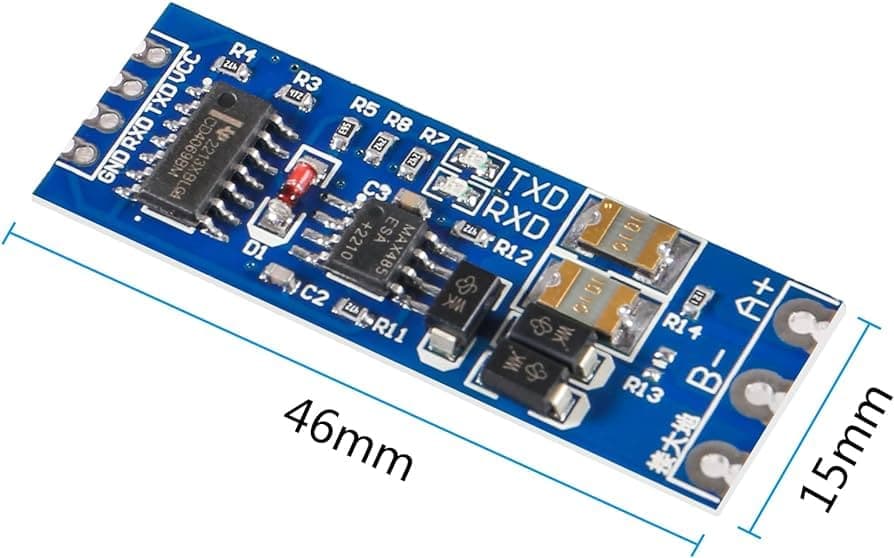
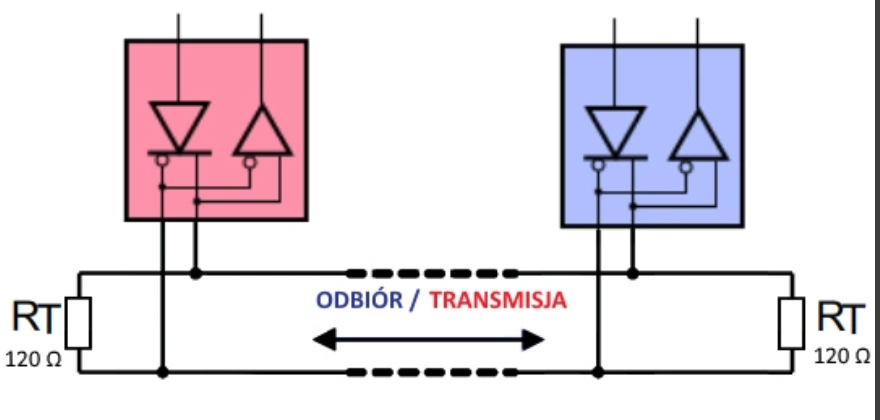
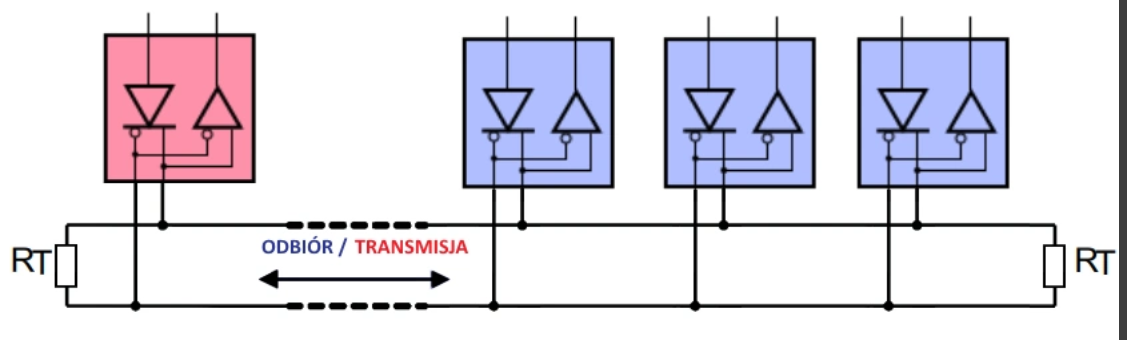
To rezystory terminujące linię na obu jej końcach (niektóre urządzenia mają je wbudowane i wystarczy włączyć, ale jak zajrzałem w tutorial, to raczej ich nie masz).
Przykład
R14 to terminator, a R13 to miejsce za zworę by go włączyć
w artykule który jest sugerowany w tutorialu masz schemat
a dla linii zawierającej więcej urządzeń RS485
w/g opisu z Allegro z oferty z mostkiem USB-RS485 ma on wbudowany terminator, ale ze zdjęć nie widać czy należy go włączyć, edit - dobra olać opis sprzedawcy, tu masz dokumentację i obrazek wnętrza w FAQ
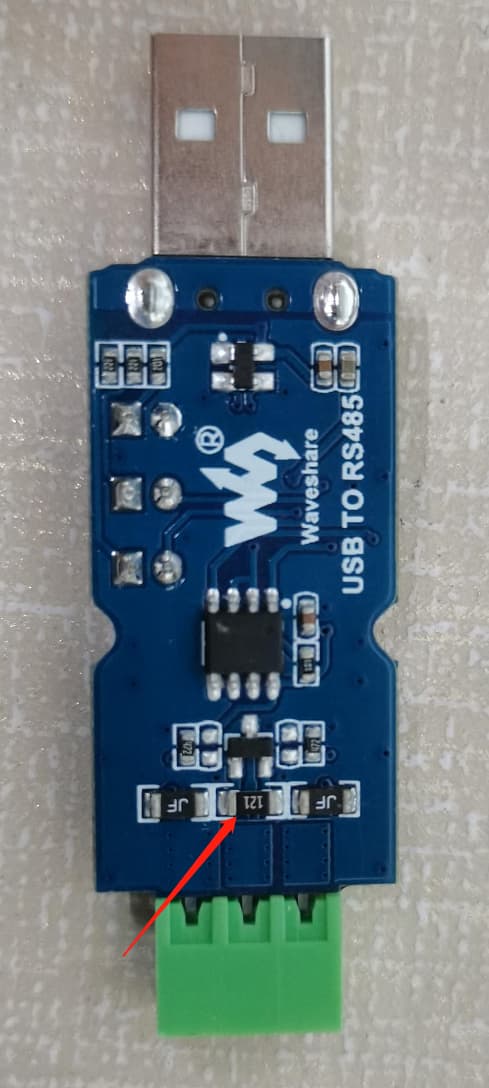
Po drugiej stronie (w Growacie) musisz raczej użyć własnego rezystora między zaciskami A i B
Przy niewielkiej odległości jest szansa na prawidłową transmisję i bez terminatora.
Panowie sukces, odpaliło dzięki za pomoc, pytanie jeszcze jedno czy jest jakaś encja pokazująca aktualną produkcję bez rozdziału na stringi bo na tym mi najbardziej zależało ?
Teraz tylko muszę pomyśleć jak to połączyć jakoś mądrze przez podwórko, ok. 20 m do boxa z HA 
Sprawdź w dokumentacji sprzętu (w tabeli rejestrów - czy w ogóle jest taki).
Ale skoro masz wszystkie wartości cząstkowe to jaki problem żeby sobie je sumować z poziomu HA?
Połóż skrętkę FTP - gdyby były problemy to zawsze będziesz mógł wymienić konwerter RS485<>ETH.
Mam 2 stringi w falowniku, jak połączyć te dane z obu w HA żeby było w jednej wartości ?
O to chodzi że musiał bym kopać przez 9 m kostki do garażu a to mi się nie uśmiecha 
Rozwiązałem to inaczej, przeniosłem boksa z HA do garażu, dociara tam sygnał wifi mojej sieci, tam podłączyłem wzmacniacz wifi i do niego podłączyłem kablem boksa.
Jak na razie wszystko hula 
Sensor template lub pomocnik.
https://forum.arturhome.pl/search?q=suma