Z tego co pamiętam to błędy te które są w kodzie powinny być wyświetlane w zakładce Current fault, fault 1, fault 2 i fault 3.
Witam.
Podłączyłem moje Rotenso Aquami modułem USR-DR404 WIFI TCP <=> Modbus RTU .
Do pliku configuration.yaml dodałem ten wiersz modbus: !include modbus.yaml i plik modbus.yaml a w nim:
- name: rotenso
  type: tcp
  host: 192.168.0.101
  port: 502
  delay: 5
  timeout: 2
  switches:
    - name: heatpump_on_off_toggle
      unique_id: heatpump_on_off_toggle
      slave: 1
      address: 0
      write_type: holding
      command_on: 2
      command_off: 0
      verify:
        input_type: holding
        address: 0
        state_on: 2
        state_off: 0
  sensors:
    - name: heatpump_Fan_Speed
      unique_id: heatpump_Fan_Speed
      scan_interval: 5
      address: 102
      state_class: measurement
      slave: 1
      scale: 1
      input_type: holding
      unit_of_measurement: r/min
    - name: heatpump_flow_rate
      unique_id: heatpump_flow_rate
      scan_interval: 5
      address: 138
      state_class: measurement
      slave: 1
      scale: 0.01
      precision: 3
      input_type: holding
      unit_of_measurement: m3/h
    - name: heatpump_power_state
      unique_id: heatpump_power_state
      address: 0
      scan_interval: 5
      slave: 1
    - name: heatpump_temperature_C1
      unit_of_measurement: °C
      state_class: measurement
      unique_id: heatpump_temperature_C1
      scan_interval: 5
      address: 2
      slave: 1
      offset: 0
      scale: 1
    - name: heatpump_temperature_TW_IN
      unit_of_measurement: °C
      state_class: measurement
      unique_id: heatpump_temperature_TW_IN
      scan_interval: 5
      address: 104
      slave: 1
      offset: 0
      scale: 1
    - name: heatpump_temperature_TW_OUT
      unit_of_measurement: °C
      state_class: measurement
      unique_id: heatpump_temperature_TW_OUT
      scan_interval: 5
      address: 105
      slave: 1
      offset: 0
      scale: 1
    - name: heatpump_condensor_temperature_T3
      unit_of_measurement: °C
      state_class: measurement
      unique_id: heatpump_condensor_temperature_T3
      scan_interval: 5
      address: 106
      slave: 1
      offset: 0
      scale: 1
    - name: heatpump_outdoor_temperature_T4
      unit_of_measurement: °C
      state_class: measurement
      unique_id: heatpump_outdoor_temperature_T4
      scan_interval: 5
      address: 107
      slave: 1
      offset: 0
      scale: 1
    - name: heatpump_exhaust_gas_temperature_Tp
      unit_of_measurement: °C
      state_class: measurement
      unique_id: heatpump_exhaust_gas_temperature_Tp
      scan_interval: 5
      address: 108
      slave: 1
      offset: 0
      scale: 1
    - name: heatpump_suction_temperature_Th
      unit_of_measurement: °C
      state_class: measurement
      unique_id: heatpump_suction_temperature_Th
      scan_interval: 5
      address: 109
      slave: 1
      offset: 0
      scale: 1
    - name: heatpump_refrigerant_liquid_side_temperature_T2
      unit_of_measurement: °C
      state_class: measurement
      unique_id: heatpump_refrigerant_liquid_side_temperature_T2
      scan_interval: 5
      address: 112
      slave: 1
      offset: 0
      scale: 1
    - name: heatpump_refrigerant_liquid_side_temperature_T2B
      unit_of_measurement: °C
      state_class: measurement
      unique_id: heatpump_refrigerant_liquid_side_temperature_T2B
      scan_interval: 5
      address: 113
      slave: 1
      offset: 0
      scale: 1
    - name: heatpump_total_water_outlet_T1
      unit_of_measurement: °C
      state_class: measurement
      unique_id: heatpump_total_water_outlet_T1
      scan_interval: 5
      address: 110
      slave: 1
      offset: 0
      scale: 1
    - name: heatpump_Operating_frequency_Hz
      unit_of_measurement: Hz
      unique_id: heatpump_Operating_frequency_Hz
      scan_interval: 5
      address: 100
      slave: 1
      offset: 0
      scale: 1
    - name: heatpump_Power
      unit_of_measurement: kW
      unique_id: heatpump_Power
      device_class: power
      scan_interval: 5
      address: 140
      state_class: measurement
      slave: 1
      scale: 0.01
      offset: 0
      precision: 3
    - name: heatpump_PMV
      unit_of_measurement: P
      unique_id: heatpump_PMV
      device_class: energy
      scan_interval: 5
      address: 103
      state_class: total_increasing
      slave: 1
    - name: heatpump_high_pressure
      unit_of_measurement: kPa
      unique_id: heatpump_high_pressure
      scan_interval: 5
      address: 116
      slave: 1
      offset: 0
      scale: 1
    - name: heatpump_low_pressure
      unit_of_measurement: kPa
      unique_id: heatpump_low_pressure
      scan_interval: 360
      address: 117
      slave: 1
      offset: 0
      scale: 1
    - name: heatpump_total_climate_curve
      unit_of_measurement: °C
      state_class: measurement
      unique_id: heatpump_total_climate_curve
      scan_interval: 5
      address: 136
      slave: 1
      offset: 0
      scale: 1
    - name: heatpump_operating_current
      unit_of_measurement: A
      unique_id: heatpump_operating_current
      device_class: energy
      scan_interval: 5
      address: 118
      state_class: total_increasing
      slave: 1
      scale: 1
      offset: 0
      precision: 3
    - name: heatpump_Compressor_operation_time
      unit_of_measurement: h
      unique_id: heatpump_Compressor_operation_timet
      device_class: energy
      scan_interval: 360
      address: 122
      state_class: total_increasing
      slave: 1
      scale: 1
      offset: 0
      precision: 3
    - name: heatpump_128
      unique_id: heatpump_128
      address: 128
      scan_interval: 5
      slave: 1
      input_type: holding
    - name: heatpump_129
      unique_id: heatpump_129
      address: 129
      scan_interval: 5
      slave: 1
      input_type: holding
    - name: heatpump_electricity_consumption
      unique_id: heatpump_electricity_consumption
      address: 143
      slave: 1
      data_type: int32
      scan_interval: 60
      unit_of_measurement: kWh
      device_class: energy
      state_class: total_increasing
      input_type: holding
    - name: heatpump_Power_output
      unique_id: heatpump_Power_output
      address: 145
      slave: 1
      data_type: int32
      unit_of_measurement: kWh
      device_class: energy
      state_class: total_increasing
      scan_interval: 60
      input_type: holding
  climates:
    - name: heatpump_climate
      unique_id: heatpump_climate
      address: 110
      slave: 1
      input_type: holding
      max_temp: 50
      min_temp: 25
      precision: 1
      scale: 1
      target_temp_register: 136
      temp_step: 1
      temperature_unit: °C
      write_registers: true
      hvac_mode_register:
        address: 1
        values:
          state_auto: 1
          state_cool: 2
          state_heat: 3
    - name: Górna temp. krzywej 9
      unique_id: gorna_temp_krzywej_9
      address: 265
      data_type: int16
      input_type: holding
      max_temp: 60
      min_temp: 25
      offset: 0
      precision: 1
      scale: 1
      target_temp_register: 265
      temp_step: 1
      temperature_unit: C
      hvac_mode_register:
        address: 0001
        values:
          state_heat: 3
    - name: Dolna temp. krzywej 9
      unique_id: dolna_temp_krzywej_9
      address: 266
      data_type: int16
      input_type: holding
      max_temp: 60
      min_temp: 25
      offset: 0
      precision: 1
      scale: 1
      target_temp_register: 266
      temp_step: 1
      temperature_unit: C
      hvac_mode_register:
        address: 0001
        values:
          state_heat: 3
    - name: Dolna temp. zewn. krzywej 9
      unique_id: dolna_temp_zewn_krzywej_9
      address: 268
      data_type: int16
      input_type: holding
      max_temp: 30
      min_temp: -25
      offset: 0
      precision: 1
      scale: 1
      target_temp_register: 268
      temp_step: 1
      temperature_unit: C
      hvac_mode_register:
        address: 0001
        values:
          state_heat: 3
    - name: Górna temp. zewn. krzywej 9
      unique_id: gorna_temp_zewn_krzywej_9
      address: 267
      data_type: int16
      input_type: holding
      max_temp: 30
      min_temp: -25
      offset: 0
      precision: 1
      scale: 1
      target_temp_register: 267
      temp_step: 1
      temperature_unit: C
      hvac_mode_register:
        address: 0001
        values:
          state_heat: 3
Problem polega na tym że się nie znam i nie wiem jak odczytywać i zapisywać pojedyncze bity .NP: informacja o defroście jest na adresie 129 BIT15 ?
I termostat nie działa - na krzywej pokazuje dobrze jak wyłączę krzywą to jest 255 stopni i nie zmienia temperatury
1 polubienie
Ogarnąłeś integrację pompy z HA po modbus.Szukam informacji jak to podpiąć i skonfigurować?Pamiętasz może gdzie podpinałeś się konwerterem pod które wejscia masz moze jakies fotki.Podpinałeś pod płyte czy do sterownika.
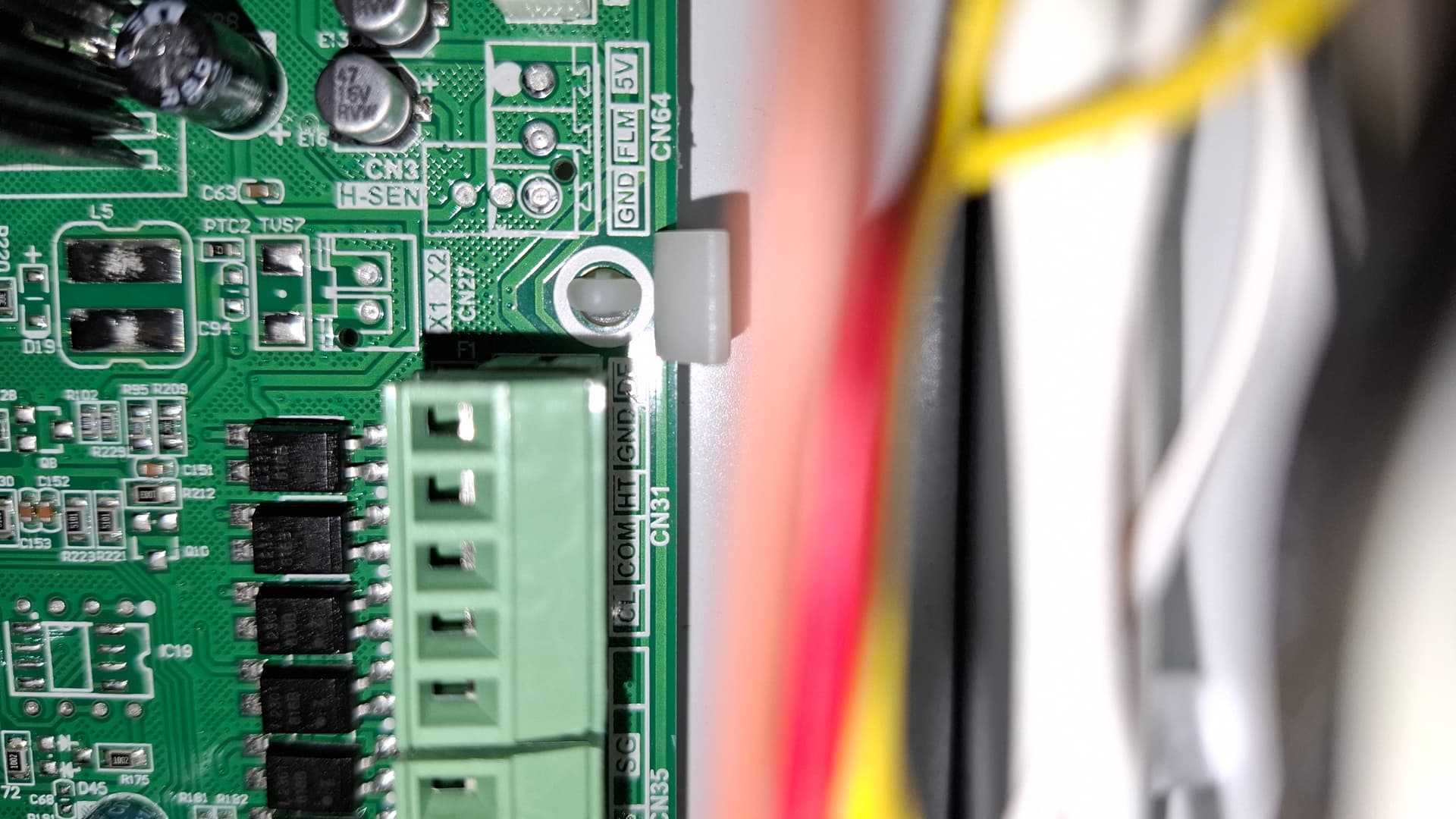
Jak to wszystko skonfigurować.Znalazłem konwerter w szufladzie ale nie wiem czy będzie ok(elfin ew11).
Posiadam Rotenso Aquami monoblock podłączałem pod sterownik przewodowy
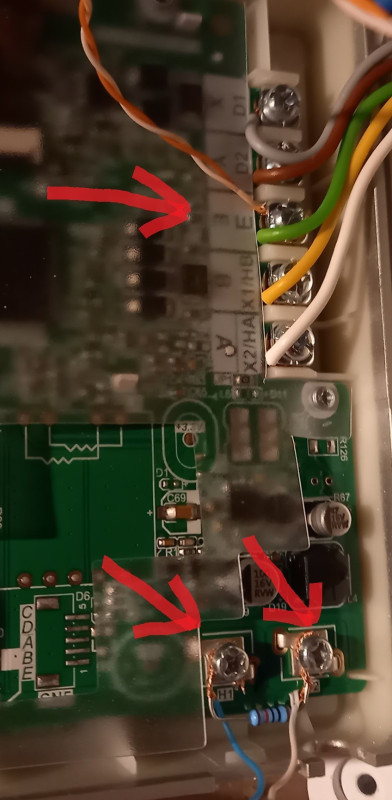
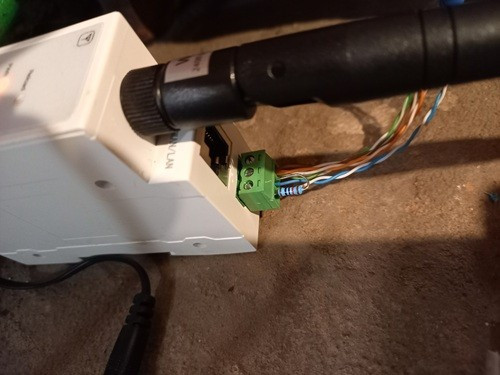
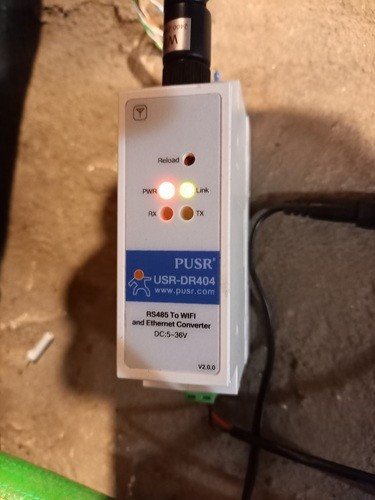
https://forum.arturhome.pl/t/pompa-ciepla-kaisai-po-modbus/15575/3?u=lajosz
1 polubienie
Czy bez tych elementow na konicach lini to nie ruszy?(co to) Ja mam elfin11ew i we wtyczce mam zasilanie (+ -) i (A B) nie mam gnd ,c,y moge pod minus elfin podpiac gnd ze sterownika? Czy trzeba jeszcze cos w jednostce aktywowac żeby modbus działał?Luknij na moje ustawienia czy tak to ma być
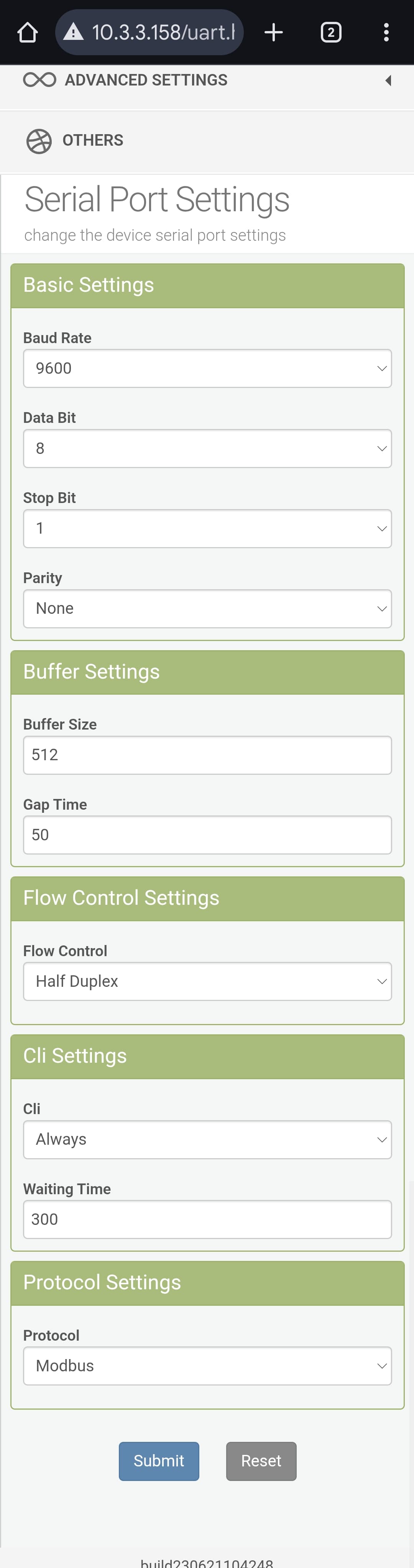
Narazie podłączylem bez E i bez tych oporniczkow ale w statusie wszedzie 0 wiec chyba brak połączenia.
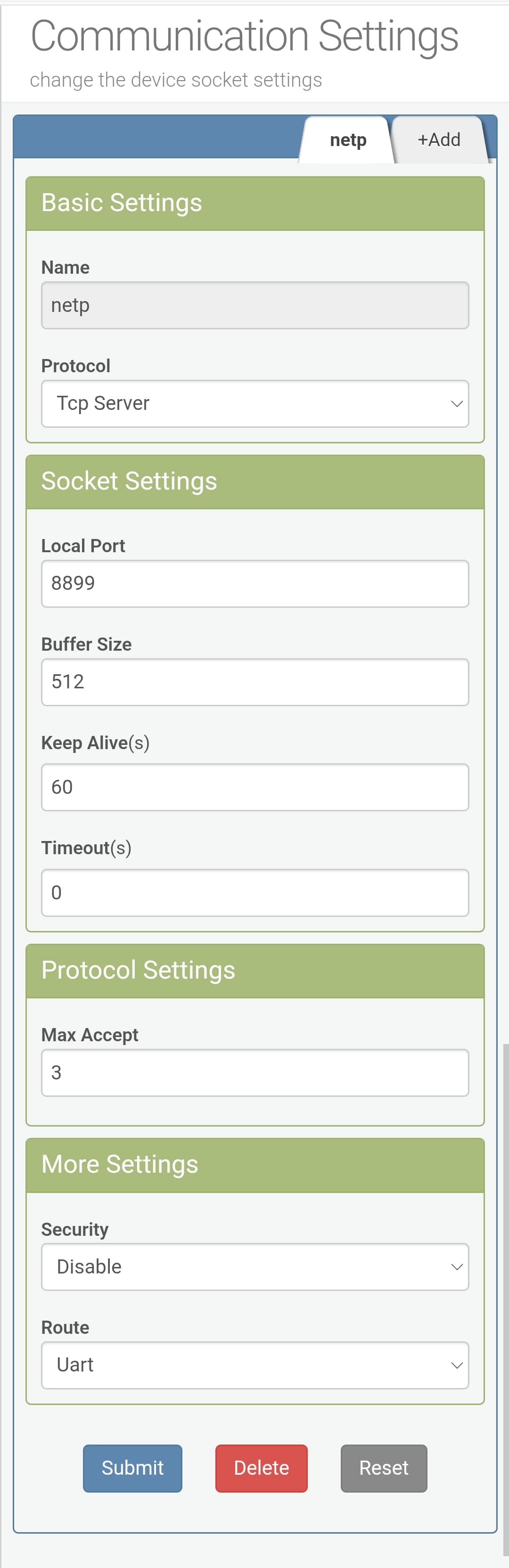

ustawione?
Jak pisałem zbytnio się nie znam.
W pompie nic nie aktywujesz - działa samo. Te elementy to terminacja Lini - rezystor 120 omów . Możesz podłączyć tylko AiB masa (gdn) nie jest wymagana ale dobrze podłączyć tylko z jednej strony . Mój konwerter zamienia TCP na RTU inaczej trzeba ustawić type: rtuovertcp (chyba) . Ale lepiej jakby wypowiedział się ktoś kto się zna.
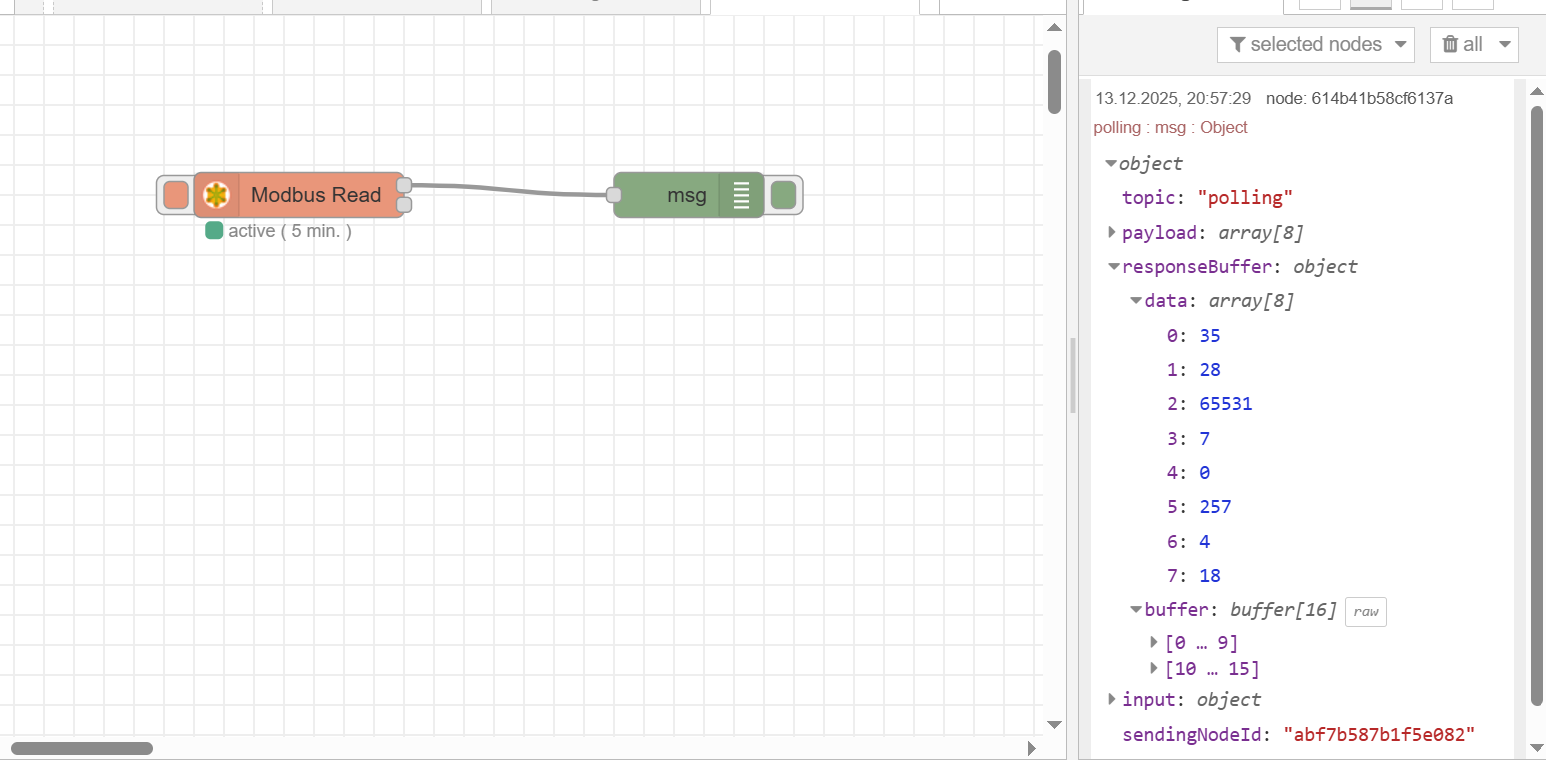
jest swiatełko w tunelu  Można na Was liczyć,juz nie pierwszy raz otrzymuję tu pomocną dłoń :
podzielisz sie swoim kodem modbus.yaml i dashbordem ,pewnie bede sobie go modyfikował ale tak by było najszybciej
Modbus.yaml umieściłem wyżej .
Widzę że robisz w NR ja to ogarnąłem inaczej.
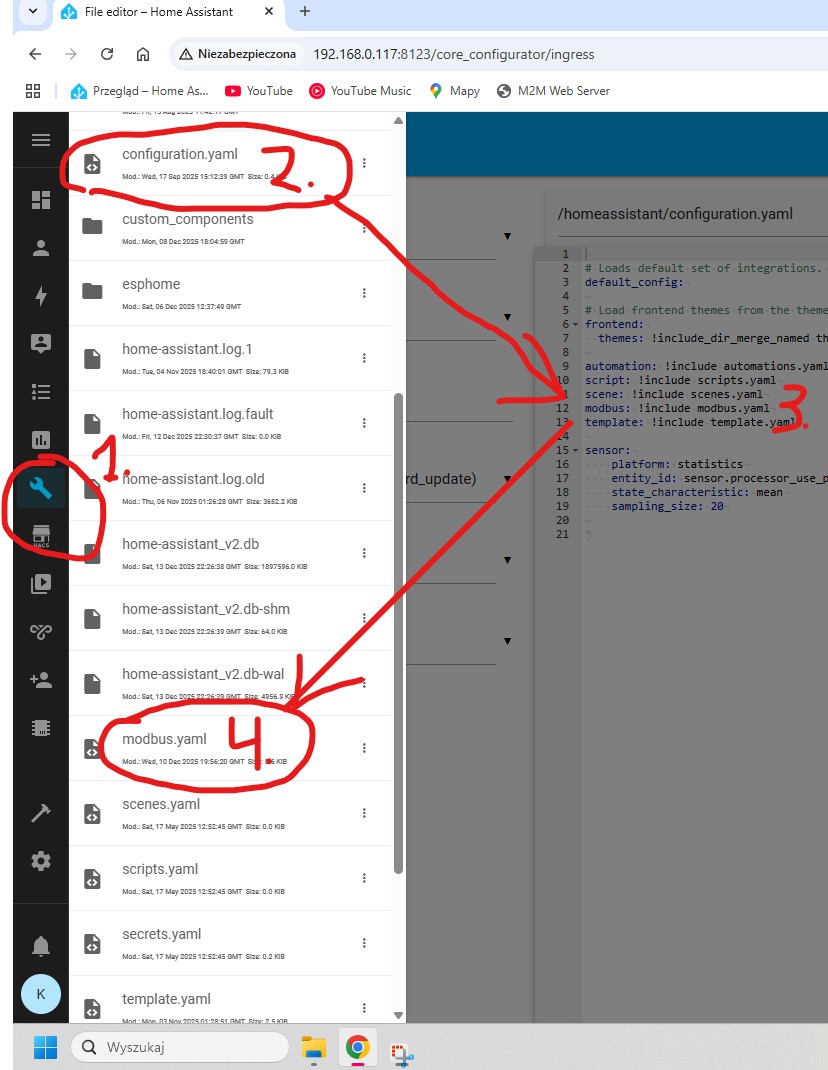
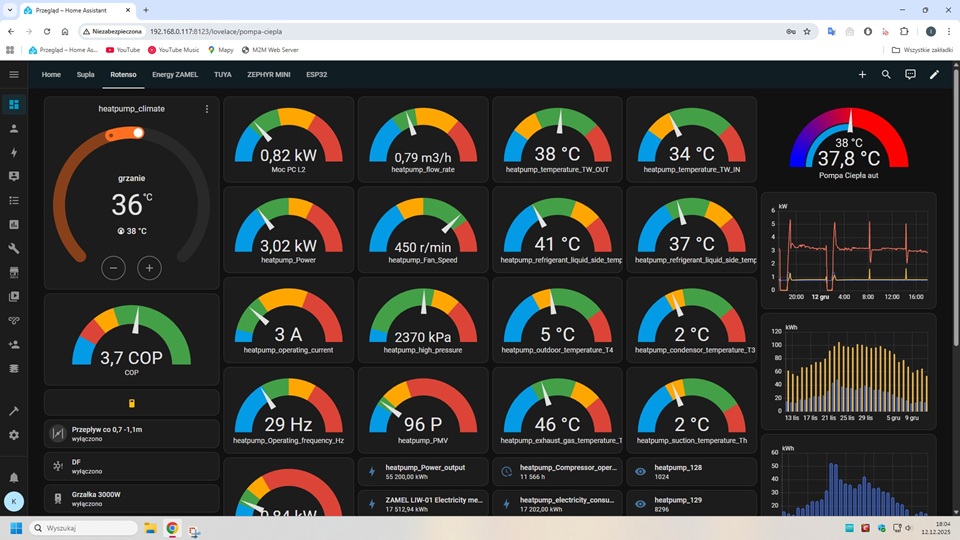
Dashbord pewnie nie będzie pasował bo są jeszcze pomocnicy , liczniki zamel i sterowanie zaworem zewnętrznym po modbus . Cop wyliczam template dzieląc moc cieplną wygenerowaną z pompy przez zewnętrzny licznik Zamela
type: grid
cards:
  - type: vertical-stack
    cards:
      - type: thermostat
        entity: climate.heatpump_climate
        show_current_as_primary: true
      - type: gauge
        entity: sensor.cop
        max: 6
        min: 1
        needle: true
        severity:
          green: 3
          yellow: 2.4
          red: 1.8
      - show_name: false
        show_icon: true
        type: button
        entity: switch.heatpump_on_off_toggle
        grid_options:
          columns: 12
          rows: auto
        show_state: false
        icon_height: 22px
      - type: tile
        entity: switch.pc_valve1
        name: Przepływ co 0,7 -1,1m
        icon: mdi:valve
        color: accent
        show_entity_picture: true
        state_content: state
        vertical: false
        features_position: bottom
      - type: tile
        entity: binary_sensor.df
        icon: mdi:snowflake-alert
        color: accent
        show_entity_picture: true
        hide_state: false
        vertical: false
        features_position: bottom
      - type: tile
        entity: binary_sensor.grzalka_3000w
        icon: mdi:water-boiler
        color: red
        show_entity_picture: true
        vertical: false
        features_position: bottom
  - type: vertical-stack
    cards:
      - type: gauge
        entity: sensor.zamel_lew_02_electricity_meter_power_active_phase_1
        needle: true
        severity:
          green: 0.7
          yellow: 1.3
          red: 2
        min: 0
        max: 3
        grid_options:
          columns: 12
          rows: auto
        unit: kW
        name: Moc PC L2
      - type: gauge
        entity: sensor.heatpump_power
        needle: true
        severity:
          green: 2.9
          yellow: 5
          red: 6.5
        min: 0
        max: 10
        grid_options:
          columns: 10
          rows: auto
        unit: kW
      - type: gauge
        entity: sensor.heatpump_operating_current
        needle: true
        severity:
          green: 1
          yellow: 4
          red: 8
        min: 0
        grid_options:
          columns: 10
          rows: auto
        max: 13
      - type: gauge
        entity: sensor.heatpump_operating_frequency_hz
        needle: true
        severity:
          green: 30
          yellow: 45
          red: 60
        min: 0
        max: 90
        grid_options:
          columns: 12
          rows: auto
      - type: gauge
        entity: sensor.moc_pompy_ciepla
        needle: true
        severity:
          green: 0.7
          yellow: 1.3
          red: 2
        min: 0
        max: 6
        grid_options:
          columns: 10
          rows: auto
        unit: kW
    grid_options:
      columns: 9
      rows: auto
  - type: vertical-stack
    cards:
      - type: gauge
        entity: sensor.heatpump_flow_rate
        needle: true
        severity:
          green: 0.6
          yellow: 0.9
          red: 1.45
        min: 0
        grid_options:
          columns: 10
          rows: auto
        max: 2
      - type: gauge
        entity: sensor.heatpump_fan_speed
        needle: true
        severity:
          green: 300
          yellow: 200
          red: 480
        max: 600
        grid_options:
          columns: 10
          rows: auto
        min: 0
      - type: gauge
        entity: sensor.heatpump_high_pressure
        needle: true
        severity:
          green: 800
          yellow: 2600
          red: 3200
        max: 4200
        grid_options:
          columns: 10
          rows: auto
        min: 500
      - type: gauge
        entity: sensor.heatpump_pmv
        needle: true
        severity:
          green: 83
          yellow: 112
          red: 190
        min: 0
        max: 480
        grid_options:
          columns: 10
          rows: auto
      - type: tile
        entity: sensor.heatpump_power_output
        vertical: false
        features_position: bottom
      - type: tile
        entity: sensor.zamel_liw_01_electricity_meter_value
        vertical: false
        features_position: bottom
    grid_options:
      columns: 9
      rows: auto
  - type: vertical-stack
    cards:
      - type: vertical-stack
        cards:
          - type: gauge
            entity: sensor.heatpump_temperature_tw_out_2
            needle: true
            severity:
              green: 34
              yellow: 30
              red: 44
            min: 25
            max: 50
            grid_options:
              columns: 10
              rows: auto
      - type: gauge
        entity: sensor.heatpump_refrigerant_liquid_side_temperature_t2b
        needle: true
        severity:
          green: 40
          yellow: 65
          red: 80
        min: 10
        max: 100
        grid_options:
          columns: 10
          rows: auto
      - type: gauge
        entity: sensor.heatpump_outdoor_temperature_t4
        needle: true
        severity:
          green: 5
          yellow: 0
          red: 20
        min: -15
        max: 29
        grid_options:
          columns: 10
          rows: auto
      - type: gauge
        entity: sensor.heatpump_exhaust_gas_temperature_tp
        needle: true
        severity:
          green: 40
          yellow: 65
          red: 80
        min: 10
        max: 100
        grid_options:
          columns: 10
          rows: auto
      - type: tile
        entity: sensor.heatpump_compressor_operation_time
        icon: mdi:clock-check-outline
        vertical: false
        features_position: bottom
      - type: tile
        entity: sensor.heatpump_electricity_consumption
        vertical: false
        features_position: bottom
    grid_options:
      columns: 9
      rows: auto
  - type: vertical-stack
    cards:
      - type: gauge
        entity: sensor.heatpump_temperature_tw_in
        needle: true
        severity:
          green: 34
          yellow: 30
          red: 44
        min: 25
        max: 50
        grid_options:
          columns: 10
          rows: auto
      - type: gauge
        entity: sensor.heatpump_refrigerant_liquid_side_temperature_t2
        needle: true
        severity:
          green: 30
          yellow: 55
          red: 70
        min: 0
        max: 90
        grid_options:
          columns: 10
          rows: auto
      - type: gauge
        entity: sensor.heatpump_condensor_temperature_t3
        needle: true
        severity:
          green: 5
          yellow: 0
          red: 20
        min: -15
        max: 30
        grid_options:
          columns: 10
          rows: auto
      - type: gauge
        entity: sensor.heatpump_suction_temperature_th
        needle: true
        severity:
          green: 5
          yellow: 0
          red: 22
        min: -15
        max: 30
        grid_options:
          columns: 10
          rows: auto
      - type: tile
        entity: sensor.heatpump_128
        vertical: false
        features_position: bottom
      - type: tile
        entity: sensor.heatpump_129
        vertical: false
        features_position: bottom
    grid_options:
      columns: 9
      rows: auto
  - type: vertical-stack
    cards:
      - type: custom:gauge-card-pro
        entity: sensor.sonoff_basic_r3_pompa_ciepla_aut
        use_new_from_segments_style: true
        segments:
          - from: 25
            color: blue
          - from: 28
            color: red
        needle: true
        gradient: true
        entity2: sensor.heatpump_temperature_tw_out_2
        max: 50
        min: 25
        hide_background: true
        tap_action:
          action: more-info
        primary_value_text_tap_action:
          action: more-info
        gradient_resolution: high
        secondary_value_text_tap_action:
          action: more-info
        icon_tap_action:
          action: more-info
        inner:
          mode: severity
        titles:
          primary: "{{ state_attr(entity, 'friendly_name') }}"
      - chart_type: line
        period: 5minute
        type: statistics-graph
        entities:
          - sensor.heatpump_flow_rate
          - sensor.zamel_lew_02_electricity_meter_power_active_phase_1
          - sensor.heatpump_power
        stat_types:
          - mean
        days_to_show: 1
        min_y_axis: 0
        grid_options:
          columns: 12
          rows: null
        fit_y_data: true
        logarithmic_scale: false
        hide_legend: true
        unit: kW
      - chart_type: bar
        period: day
        type: statistics-graph
        entities:
          - >-
            sensor.zamel_lew_02_electricity_meter_total_forward_active_energy_phase_1
          - sensor.heatpump_power_output
        days_to_show: 30
        min_y_axis: 0
        grid_options:
          columns: 12
          rows: null
        fit_y_data: true
        logarithmic_scale: false
        hide_legend: true
        stat_types:
          - change
      - chart_type: bar
        period: day
        type: statistics-graph
        entities:
          - sensor.zamel_liw_01_electricity_meter_value
        days_to_show: 30
        min_y_axis: 0
        grid_options:
          columns: 12
          rows: null
        fit_y_data: true
        logarithmic_scale: false
        hide_legend: true
        stat_types:
          - change
    grid_options:
      columns: 12
      rows: 11
  - type: history-graph
    entities:
      - entity: switch.pc_valve1
      - entity: switch.pc_valve2
      - entity: binary_sensor.df
      - entity: binary_sensor.grzalka_3000w
      - entity: sensor.heatpump_129
      - entity: sensor.heatpump_128
    grid_options:
      columns: 69
      rows: auto
  - type: tile
    grid_options:
      columns: 9
      rows: 2
    entity: climate.gorna_temp_zewn_krzywej_9
    vertical: false
    tap_action:
      action: toggle
    features:
      - type: target-temperature
    features_position: bottom
  - type: tile
    grid_options:
      columns: 9
      rows: 2
    entity: climate.gorna_temp_krzywej_9
    vertical: false
    tap_action:
      action: toggle
    features:
      - type: target-temperature
    features_position: bottom
  - type: statistic
    entity: sensor.heatpump_power
    period:
      calendar:
        period: day
    stat_type: mean
    name: Średnia Dziś
  - type: tile
    grid_options:
      columns: 9
      rows: 2
    entity: climate.dolna_temp_zewn_krzywej_9
    vertical: false
    tap_action:
      action: toggle
    features:
      - type: target-temperature
    features_position: bottom
  - type: tile
    entity: climate.dolna_temp_krzywej_9
    vertical: false
    tap_action:
      action: toggle
    features:
      - type: target-temperature
    features_position: bottom
    grid_options:
      columns: 9
      rows: 2
column_span: 10
1 polubienie
nie w nodred tylko próbowałem czy jest komunikacja
robię to w yaml
masz racje nie będzie pasował, zrobię po swojemu ,
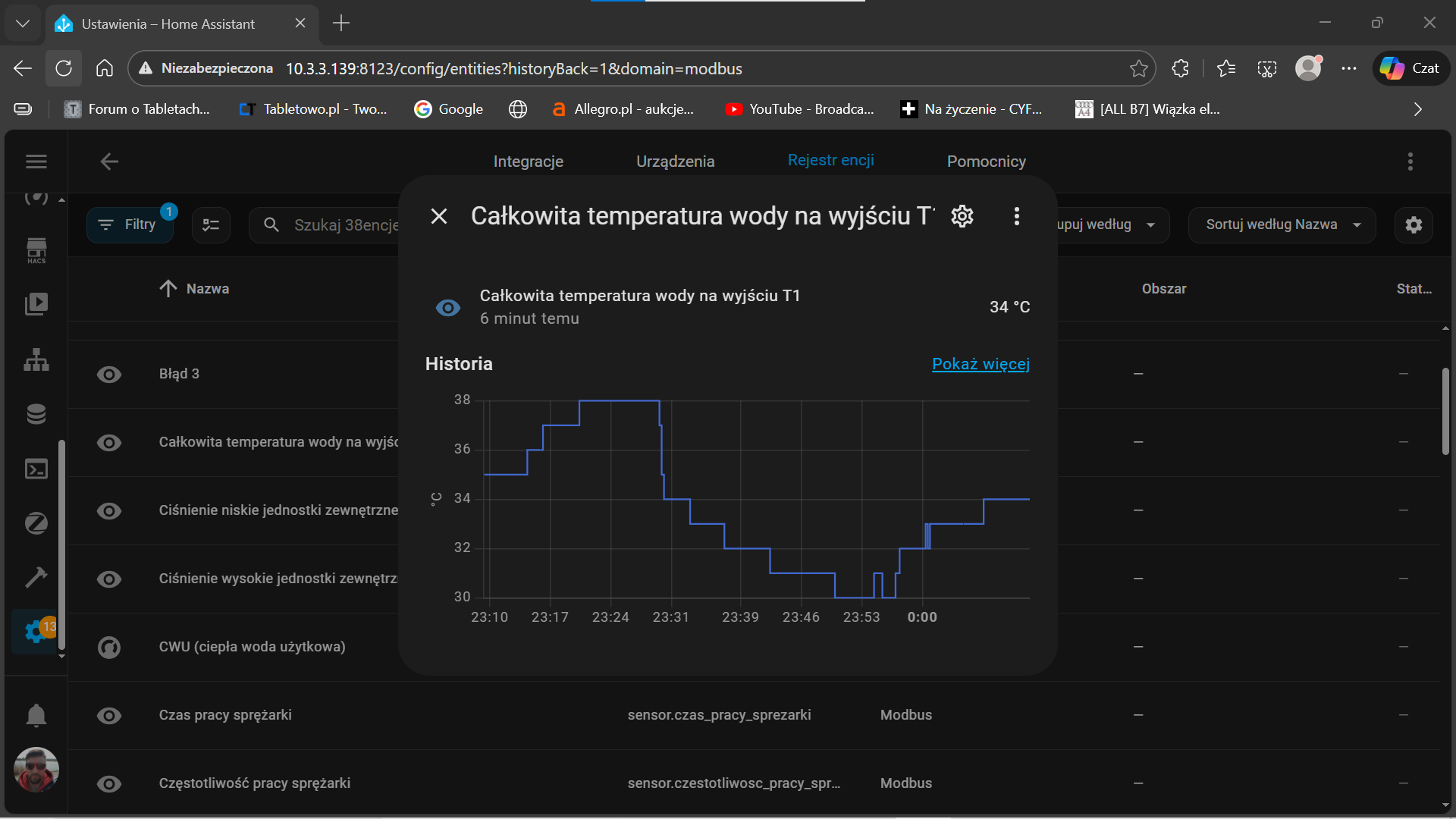
ale już jest dobrze
jak ogarnę to się pochwałę . Dzięki za pomoc.
Probuje dostosowac swoja stara kartę pompy ciepla diy do nowej york.Jeszcze sporo mi brakuje :stan pracy ,jaki tryb ,ktora krzywa i mozliwosc zmiany,czy praca reczna na salej temp czy z krzywej.Duzo aderesow modbus zwraca jakieś liczby ktore nie wiem za co odpowiadają.Jak ktos ma wieksza wiedzę to moze sie podzieli.Na ta chwile wyglada to tak

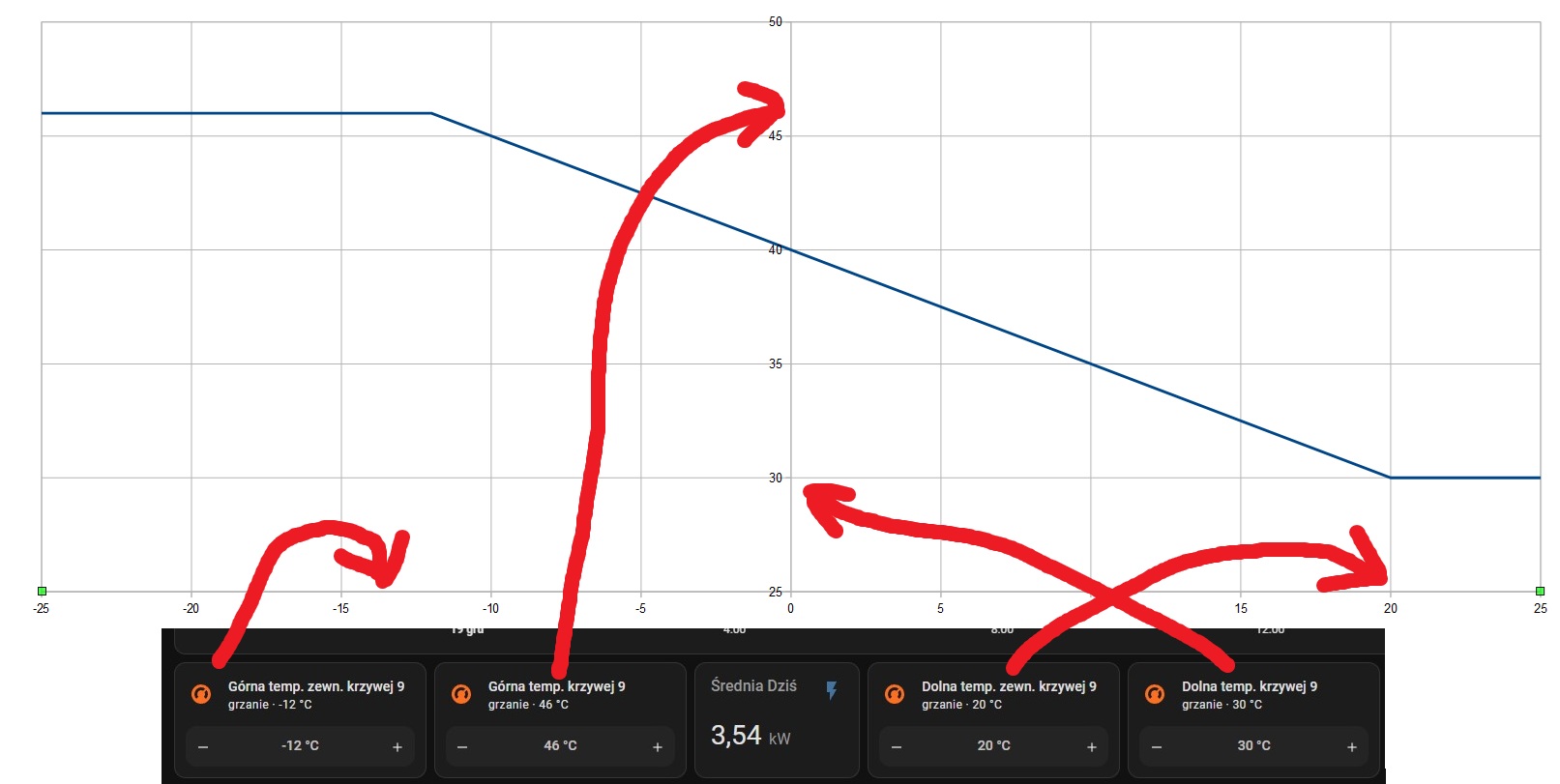
Plus do tego termostat zadawania stalelej i 4 termistaty krzywej 9 ktorej nie testiwalem jeszcze.Nue wiem za bardzo o co chodzi z tą krzywą ,te termostaty to temp zadane krzywej 9?
Powoli naprzód ,moze sie uda zrezygnowac calkiem z aplikacji na rzecz HA.Zostały do ogarniecia tryb cichy ,eko .Harmonogramy chyba sobie daruję
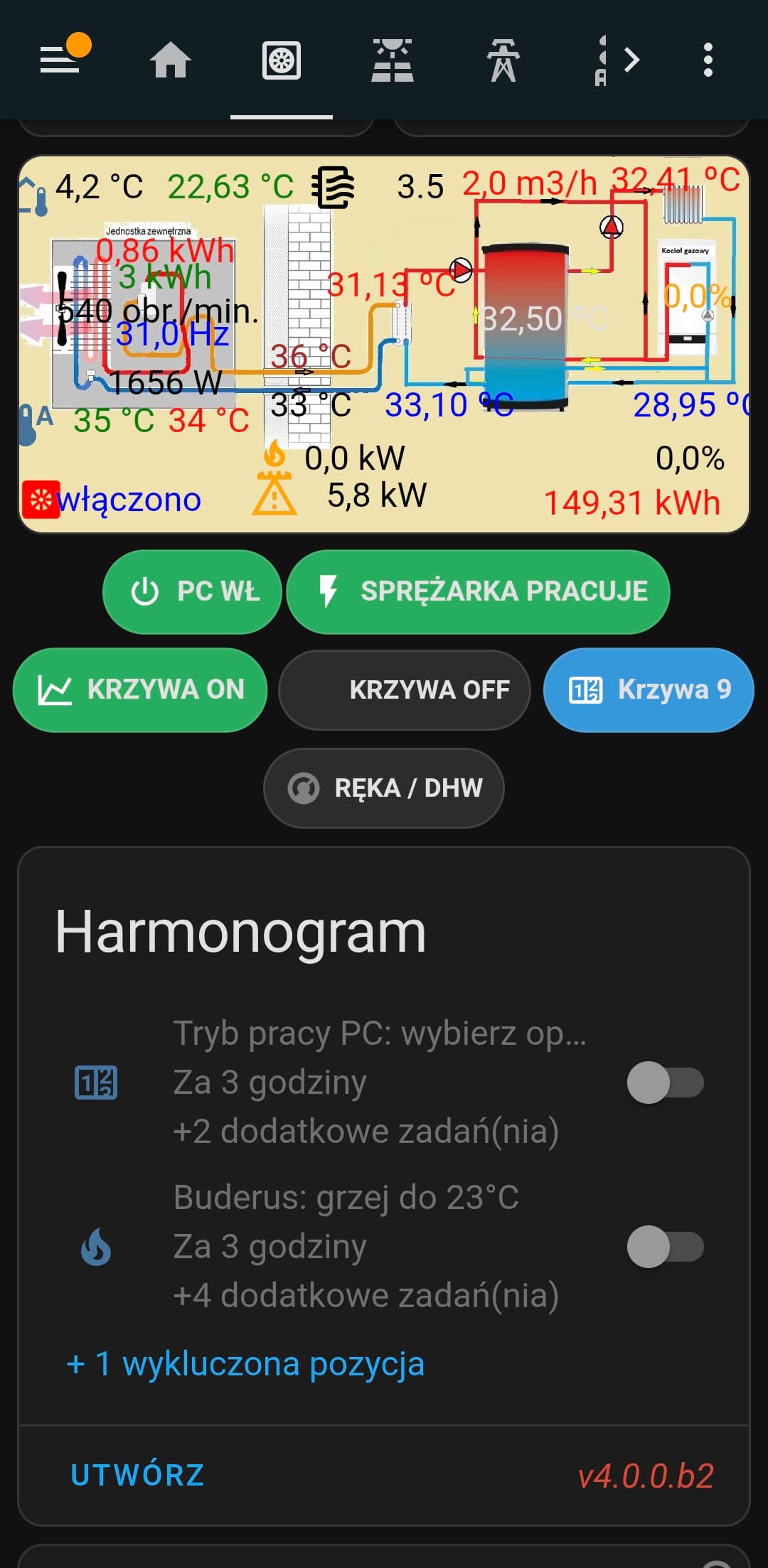
Co do krzywej 9 . W sterowniku przewodowym wybierasz krzywą 9 w której sam określasz temperatury wody kotłowej . W HA możesz potem zmieniać , ale po każdej zmianie krzywej pompa się wyłącza trzeba ją włączyć klikając ON w HA.
1 polubienie
A czy jest opcja dostania się do odczytu i zmiany w nastawach serwisowych pompy z poziomu HA?
Dzieki pomocy osiągnąłem prawie wszystko co chciałam,jest juz nawet stworzony w HA termostat ze srednich temp w pomieszczeniach i on/off pompy.
Pracuje z trochę wyższą temp niz zakładałem, ale poprawiło to czasy pracy sprężarki i jej przestoje.Krzywa9 jest ,ale pilnuje jeszcze tego termostat . Gdyby ta pompa modulowała do 20Hz pewnie niebyły potrzebny.
Cześć wszystkim. Czy ktoś może podpowiedzieć jak podłączyć termostat pokojowy do pompy Kaisai KMK‑100RY3. Chcę podłączyć się przez ZRS1LN-NCMR na ZigBee.
Dziękuję bardzo za instrukcję. Czy mógłbyś mi napisać do czego mam się podpiąć w tym moim urządzonku ZRS1LN-NCMR. Nie chcę spalić pompy. Z tego co zobaczyłem to w pompie muszę się podpiąć do 3 i 15.
To zależy jak jest skonfigurowana, jeśli nie masz pojęcia co robisz zaproś instalatora, który ją zakładał…
Ta firma która to zakładała za każdą wizytę życzy sobie 500zl. Jeżeli do podpięcia jest tylko kilka przewodów to ogarnę to sam,pod warunkiem że będę wiedział co z czym połączyć. Nie uśmiecha mi się wspierać złodziejskiej firmy,która i tak już na mnie zarobiła kilkadziesiąt tysięcy. Oni mi zakładali wszystko z dotacji. Termostat pokojowy powinni mi od razu zamontować a nie pójść po jak najmniejszym oporze.
To przeczytaj tę instrukcję (ona jest napisana dla ludzi o przeciętnym wykształceniu technicznym, nie dla profesorów), zrozum i zrób.
1 polubienie