Czyli co mogę zrobić żeby zadziałało? Bo przecież działać powinno.
Teoretycznie Ty nic nie możesz zrobić - nie jesteś autorem komponentu.
A praktycznie to przejść na wersje V5 i zobaczyć czy to coś zmieni.
Lub zakupić nowszy hardware ( SX1276/SX1262 jako gotowe płytki ) a następnie wybrać jedno z 3-ech software które jest na Forum.
1 polubienie
Ale wodomierze Apator 16-2 to żadna nowość, są użytkownicy którzy u używają tego od dawna z powodzeniem, to dlaczego u mnie akurat nie działa?
Napisałem Ci wcześniej - logika komponentu sobie z tym nie radzi i dopóki autor tego nie poprawi to nic z tym nie zrobisz.
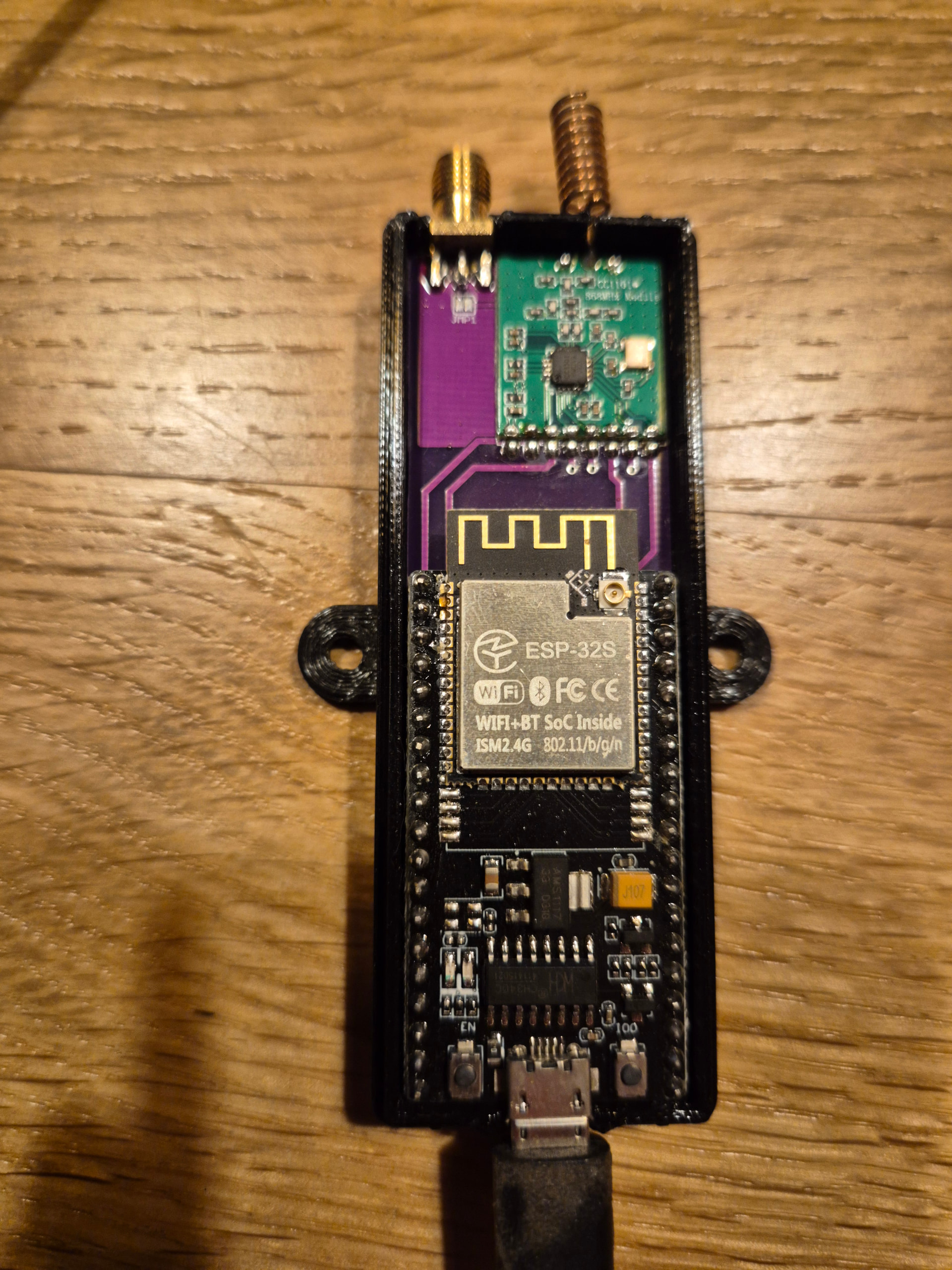
posiadam takowy wynalazek który działał sobie ponad 2 lata. Jednak pewnego dnia zapragnąłem zmienić jeną nakładkę na liczniku i musiałem w związku z tym przeedytować kod. Plik się ładnie skompilował ale niestety po wgraniu czytnik się resetuje. Dodam że wcześniej aktualizowałem w miarę na bieżąco ESPHome ale zatrzymałem się na wersji 2025.12 a teraz po uaktualniieniu do 2026.4 taki problem. Co może być przyczyną?
Taki log po wgraniu:
[10:43:54]     01 99 00390000 00001000
[10:43:54]I (90) boot:  5 spiffs           Unknown data     01 82 00391000 0000f000
[10:43:54]I (97) boot:  6 nvs              WiFi data        01 02 003a0000 00060000
[10:43:54]I (103) boot: End of partition table
[10:43:54]I (107) esp_image: segment 0: paddr=00010020 vaddr=3f400020 size=64a6ch (412268) map
[10:43:54]I (255) esp_image: segment 1: paddr=00074a94 vaddr=3ffb0000 size=04130h ( 16688) load
[10:43:54]I (261) esp_image: segment 2: paddr=00078bcc vaddr=40080000 size=0744ch ( 29772) load
[10:43:54]I (273) esp_image: segment 3: paddr=00080020 vaddr=400d0020 size=134140h (1261888) map
[10:43:54]I (704) esp_image: segment 4: paddr=001b4168 vaddr=4008744c size=0bab4h ( 47796) load
[10:43:54]I (723) esp_image: segment 5: paddr=001bfc24 vaddr=50000000 size=00020h (    32) load
[10:43:54]I (733) boot: Loaded app from partition at offset 0x10000
[10:43:54]I (733) boot: Disabling RNG early entropy source...
[10:43:54]Guru Meditation Error: Core  0 panic'ed (LoadProhibited). Exception was unhandled.
[10:43:54]
[10:43:54]Core  0 register dump:
[10:43:54]PC      : 0x400db32b  PS      : 0x00060130  A0      : 0x80151718  A1      : 0x3ffe39e0
[10:43:54]A2      : 0x00000000  A3      : 0x00000001  A4      : 0x3f41db69  A5      : 0x000000aa
[10:43:54]A6      : 0x3f41e88f  A7      : 0x00000000  A8      : 0x00000000  A9      : 0x3ffe3a40
[10:43:54]A10     : 0x000000ff  A11     : 0x3ffbdfb0  A12     : 0x00000003  A13     : 0x00000040
[10:43:54]A14     : 0x00000006  A15     : 0x00000006  SAR     : 0x00000020  EXCCAUSE: 0x0000001c
[10:43:54]EXCVADDR: 0x0000002c  LBEG    : 0x4000c2e0  LEND    : 0x4000c2f6  LCOUNT  : 0xffffffff
[10:43:54]
[10:43:54]
[10:43:54]Backtrace: 0x400db328:0x3ffe39e0 0x40151715:0x3ffe3a30 0x4014cd7d:0x3ffe3a60 0x4014467d:0x3ffe3ac0 0x40129f71:0x3ffe3bf0 0x40174b2e:0x3ffe3c30 0x40081e76:0x3ffe3c60 0x40079826:0x3ffe3c90 |<-CORRUPTED
[10:43:54]
[10:43:54]
[10:43:54]
[10:43:54]
[10:43:54]ELF file SHA256: 0aa387b61
[10:43:54]
[10:43:54]Rebooting...
A to kod:
esp32:
  board: nodemcu-32s
  framework:
    type: arduino

external_components:
  - source: github://SzczepanLeon/esphome-components@version_4
    components: [wmbus]
    refresh: 0d

time:
 - platform: sntp
   id: time_sntp

logger:
  level: debug

# Enable Home Assistant API
api:
  encryption:
    key: "sUO24ieOeOOhQoeaYGq+ESZn57bX+4xwnbc6ZytrOwg="

ota:
  - platform: esphome

wifi:
  ssid: "H"
  password: "a"
  power_save_mode: none
  fast_connect: true
  reboot_timeout: 10min
  manual_ip:
    static_ip: 192.168.8.150
    gateway: 192.168.8.1
    subnet: 255.255.255.0
    dns1: 192.168.8.1
  ap:
    ssid: "WMBUS Reader - Fallback Hotspot"
    password: "12345678"

captive_portal:

web_server:
  port: 80
  version: 2

wmbus:
  mosi_pin: GPIO32
  clk_pin: GPIO33
  miso_pin: GPIO19
  gdo2_pin: GPIO21
  gdo0_pin: GPIO22
  cs_pin: GPIO23
  log_all: false
  led_pin: GPIO2
  led_blink_time: "1s"
  sync_mode: true
  all_drivers: false

sensor:
  - platform: wmbus
    meter_id: 0x00506001
    type: apator162
    key: "00000000000000000000000000000000"
    sensors:
      - name: "RSSI - WODA 1"
        field: "rssi"
        accuracy_decimals: 0
        unit_of_measurement: "dBm"
        device_class: "signal_strength"
        state_class: "measurement"
        entity_category: "diagnostic"
      - name: "woda1"
        id: woda1_total
        field: "total"
        filters:
          - offset: -161.105
        accuracy_decimals: 3
        unit_of_measurement: "m³"
        device_class: "water"
        state_class: "total_increasing"
        icon: "mdi:water"
  - platform: wmbus
    meter_id: 0x0469427
    type: apator162
    key: "00000000000000000000000000000000"
    sensors:
      - name: "RSSI - WODA 2"
        field: "rssi"
        accuracy_decimals: 0
        unit_of_measurement: "dBm"
        device_class: "signal_strength"
        state_class: "measurement"
        entity_category: "diagnostic"
      - name: "woda2"
        id: woda2_total
        field: "total"
        filters:
          - offset: 55.359
        accuracy_decimals: 3
        unit_of_measurement: "m³"
        device_class: "water"
        state_class: "total_increasing"
        icon: "mdi:water"

  - platform: wifi_signal
    name: "WiFi Signal dB"
    id: wifi_signal_db
    update_interval: 60s
    entity_category: "diagnostic"
Winowajcą jest najprawdopodobniej niekompatybilność zewnętrznego komponentu wmbus z nową wersją ESPHome. Wersja, którą masz wpiętą (version_4), mogła przestać współpracować z najnowszym frameworkiem, który ESPHome zaktualizował…
Spróbuj na esp-idf, albo przejdź na V5
Z tego co mi wiadomi V5 wspiera CC1101, ale dokumentacja nie pomaga: Jeden fragment mówi:
NOTE: Component with CC1101 support is here: version 4 version 3 version 2
A drugi:
- Add configurable frequency for CC1101 (300–928 MHz, default 868.95 MHz)
- Add CC1101 support with FIFO overflow handling and errata workaround
I trzeci:
For CC1101 radio, configure the SPI bus and specify the chip select and IRQ (GDO0) pins
Ale V5 na 100% nie obsługuje Arduino:
- Migrate to esp-idf and drop Arduino!
Spróbuj zainstalować starsza wersję ESPHome (tę na której ostatnio kompilowałeś) i przekompiluj ponownie.
Miałem niedawno podobny przypadek z version_3. Opisałem to:
https://forum.arturhome.pl/t/komponent-wm-bus-do-esphome-szczepanleon-wersja-3-x-watek-ogolny
w dniu 22.04.2026
1 polubienie
A która wersja działa ? Bo ja mam v5 i musiałem pozostać na ostatniej kompilacji esphome 2026.3.3 bo na nowszej nie chciało mi działać. Niby kompiluje ale nie mam odczytów poźniej. I obecnie zatrzymałem się na 2026.3.3
Mój yaml:
substitutions:

  name: "ttgo-lora32-v21-b09428"

  friendly_name: 'wM-Bus'

  serial_prefix: 'esp' #Don't change it.


esphome:

  name: '${name}'

  friendly_name: '${friendly_name}'

  #name_add_mac_suffix: true

  comment: Bramka urządzeń wMBus

  on_boot:

    priority: -100

    then:

#      - output.turn_off: vext_output  #załączanie zasilania OLED

      - delay: 100ms

#      - globals.set:

#          id: izar_from_memory

#          value: 'true'

      - globals.set:

          id: apator_from_memory1

          value: 'true'

      - globals.set:

          id: apator_from_memory2

          value: 'true'

#      - globals.set:

#          id: unismart_from_memory

#          value: 'true'


esp32:

  board: ttgo-lora32-v21

  framework:

    type: esp-idf

    version: recommended


external_components:

  - source: github://SzczepanLeon/esphome-components@main

    refresh: 0d

    components:

    - socket_transmitter

    - wmbus_common

    - wmbus_radio

    - wmbus_meter


wifi:

  ssid: !secret wifi_ssid

  password: !secret wifi_password

  min_auth_mode: WPA2

  use_address: xx.xx.xx.xx

  fast_connect: true


    # Hotspot when can't connect to Local WiFi

  ap:

    ssid: "wmbus AP"

    password: "xxxxxxxxxxxxxxx"


logger:

  level: DEBUG


# Enable Home Assistant API

api:

  encryption:

    key: !secret encryption_key


# Enable over-the-air updates

ota:

  platform: esphome

  password: !secret ota_password


# Serwer with a statistic data and OTA board update

web_server:

  port: 80

  version: 3

  auth:

    username: xxxxxx

    password: !secret web_server_password


captive_portal:


# Sets time from Homeassistant

time:

  - platform: homeassistant

    timezone: Europe/Warsaw

    id: homeassistant_time


output:

#  - platform: gpio

#    id: vext_output

#    pin: GPIO21

  - platform: gpio

    id: status_led

    pin: GPIO25


globals:

  - id: active_index

    type: int

    restore_value: no

    initial_value: '0'


##############Tutaj ustawiamy zmienne do zapisu ostatniego stanu licznika do pamięci urządzenia

#  # Izar

#  - id: saved_izar_value

#    type: float

#    restore_value: yes

#    initial_value: '0.0'

#  - id: izar_from_memory

#    type: bool

#    restore_value: yes

#    initial_value: 'true'


  # Apator 1

  - id: saved_apator_value1

    type: float

    restore_value: yes

    initial_value: '0.0'

  - id: apator_from_memory1

    type: bool

    restore_value: yes

    initial_value: 'true'


  # Apator 2

  - id: saved_apator_value2

    type: float

    restore_value: yes

    initial_value: '0.0'

  - id: apator_from_memory2

    type: bool

    restore_value: yes

    initial_value: 'true'


#  # Unismart

#  - id: saved_unismart_value

#    type: float

#    restore_value: yes

#    initial_value: '0.0'

#  - id: unismart_from_memory

#    type: bool

#    restore_value: yes

#    initial_value: 'true'


####################### Czas automatycznego przełączanie ekranu #########################

interval:

  - interval: 5s

    then:

      - lambda: |-

          id(active_index)++;

          if (id(active_index) >= 2) {   // liczba ekranów/wodomierzy

            id(active_index) = 0;

          }


binary_sensor:

#  - platform: gpio

#    pin: GPIO0

#    name: "Button Next Meter"

#    on_press:

#      then:

#        - lambda: |-

#            id(active_index) += 1;

#            if (id(active_index) >= 2) id(active_index) = 0;     //Tutaj ustawiamy ile jest liczników - w tym przypadku 3


  - platform: status

    name: Status


font:

  - file: 'fonts/Calibri-Regular.ttf'

    id: font1

    size: 16


i2c:          # I2C for OLED

  sda: 21

  scl: 22

  scan: true


button:

  - platform: restart

    name: "Restart"

    id: reboot


# Sensors for ESP version and WIFI information

text_sensor:

  - platform: wifi_info

    ip_address:

      name: "IP"

      icon: mdi:ip-network

    ssid:

      name: "SSID"

      icon: mdi:wifi-star


spi:

  clk_pin:

    number: GPIO5

    ignore_strapping_warning: true

  mosi_pin: GPIO27

  miso_pin: GPIO19


wmbus_radio:

  radio_type: SX1276

  cs_pin: GPIO18

  reset_pin: GPIO23

  irq_pin: GPIO33

  on_frame:

    - then:

        - repeat:

            count: 1

            then:

              - output.turn_on: status_led

              - delay: 100ms

              - output.turn_off: status_led

              - delay: 100ms


wmbus_meter:

  - id: cold_water_meter

    meter_id: 0x00068526

    type: apator162

    key: "00000000000000000000000000000000"


  - id: warm_water_meter

    meter_id: 0x723107

    type: apator162

    key: "00000000000000000000000000000000"


sensor:

  - platform: wmbus_meter

    parent_id: cold_water_meter

    field: total_m3

    device_class: water

    name: Woda-cała

    accuracy_decimals: 3

    state_class: total_increasing

    unit_of_measurement: "m³"

    icon: "mdi:water"

    filters:

      offset: +1.222

    on_value:

      then:

        - lambda: |-

            if (abs(x - id(saved_apator_value1)) > 0.01f) {

              id(saved_apator_value1) = x;

            }

            id(apator_from_memory1) = false;  // ustaw na false za każdym razem, gdy jest nowa wartość

  - platform: wmbus_meter

    parent_id: cold_water_meter

    id: RSSI_licznik_woda_cala

    field: rssi_dbm

    name: RSSI licznika wody całej

    unit_of_measurement: "dBm"


  - platform: wmbus_meter

    parent_id: warm_water_meter

    field: total_m3

    device_class: water

    name: Woda ciepła

    accuracy_decimals: 3

    state_class: total_increasing

    unit_of_measurement: "m³"

    icon: "mdi:water"

    filters:

      offset: +0.137

    on_value:

      then:

        - lambda: |-

            if (abs(x - id(saved_apator_value2)) > 0.01f) {

              id(saved_apator_value2) = x;

            }

            id(apator_from_memory2) = false;  // ustaw na false za każdym razem, gdy jest nowa wartość

  - platform: wmbus_meter

    parent_id: warm_water_meter

    id: RSSI_licznik_woda_ciepla

    field: rssi_dbm

    name: RSSI licznika wody ciepłej

    unit_of_measurement: "dBm"


  - platform: wifi_signal

    name: 'WiFi Signal'

    update_interval: 60s

    accuracy_decimals: 0

  - platform: uptime

    name: 'Uptime'

    unit_of_measurement: d

    update_interval: 300s

    accuracy_decimals: 1

    filters:

      - multiply: 0.000011574


####################################WYŚWIETLACZ###################################################


display:

  - platform: ssd1306_i2c

    model: "SSD1306 128x64"

#    reset_pin: GPIO16

#    rotation: 180

    address: 0x3C

    lambda: |-

      struct MeterInfo {

        const char* name;

        const char* id_str;

        Sensor* rssi;

        float* value;

        bool* from_mem;

      };

      /////////// definiowanie liczników - tutaj dodajemy kolejne linie, jeśli chcemy dodać licznik

      MeterInfo meters[] = {

        {"Meter: Apator", "0x00068526", id(RSSI_licznik_woda_cala), &id(saved_apator_value1), &id(apator_from_memory1)},

        {"Meter: Apator", "0x723107", id(RSSI_licznik_woda_ciepla), &id(saved_apator_value2), &id(apator_from_memory2)},

      };


      /////////// opisy

      auto draw_counter = [&](const char* name, const char* id_str, float rssi, float stan, bool from_mem) {

        it.printf(0, 0, id(font1), "Dev: %d/2", id(active_index) + 1);

        it.printf(0, 16, id(font1), name);

        it.printf(0, 28, id(font1), "ID: %s", id_str);

        if (isnan(rssi))

          it.printf(0, 40, id(font1), "RSSI: --");

        else

          it.printf(0, 40, id(font1), "RSSI: %.0f dBm", rssi);

        if (from_mem)

          it.printf(0, 52, id(font1), "State*: %.3f m3", stan);

        else

          it.printf(0, 52, id(font1), "State: %.3f m3", stan);

      };


      // pobierz dane aktywnego licznika

      MeterInfo meter = meters[id(active_index)];

      draw_counter(meter.name, meter.id_str, meter.rssi->state, *(meter.value), *(meter.from_mem));
Nie wiem jak jest z v5 i CC1101.
Próbowałem na wersji 4 i miałem podobnie jak @super restarty co chwilę.
Szkoda mi było czasu na eksperymety.
Dlatego wróciłem do v3 i ESPHome 2025.10 - tu działa stabilnie.
1 polubienie
Tylko ja mam radio SX1276
To jaki masz problem?
mógłbyś podesłać swój kod pod wersję 3 bo przy kompilacji dużo błędów
Wrzucę szkic w wątku wersji 3, aby nie mieszać tematów.
1 polubienie
Cześć, podepnę się pod temat problemu z komponentem wmbus.
Mój sprzęt to Dell Wyse 5070 z HA 2026.5.4 na Proxmox.
Płytkę ESP32 mam już drugą, teraz dokładnie ESP32S v1.1 NODEMCU. Wcześniej ESP32 WiFi + BLE 4.2 płytka zgodna z DevKitC ESP-WROOM-32U ze złączem na antenę.
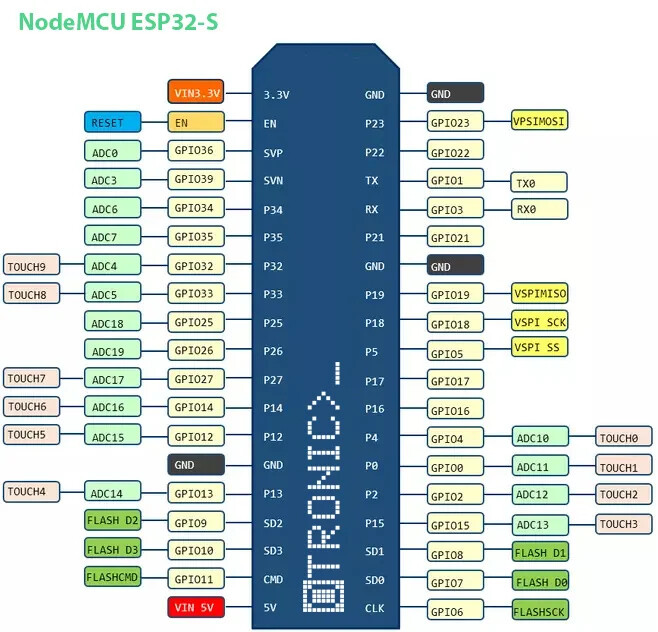
Podłączam do nich zieloną CC1101. Dodatkowo mam sensor DS18B20.
No i sensor temperatury działa bez przeszkód a z CC1101 nie umiem sobie poradzić.
Mój Yaml:
esphome:
  name: esp32piwnica
  friendly_name: esp32.piwnica

esp32:
  board: esp32dev
  framework:
    type: arduino
    advanced:
      minimum_chip_revision: "3.1"
      sram1_as_iram: True

# Enable logging
logger:
  level: VERY_VERBOSE

# Enable Home Assistant API
api:
  encryption:
    key: "/IpbYhCKgOwaxGm4XM+MQrz2Q9O3kN2Ai4ckNieAF5g="

ota:
  - platform: esphome
    password: "e3fb9sa4ecc59cf8dd2ec9abe30dfd27"

wifi:
  ssid: !secret wifi_ssid
  password: !secret wifi_password
  output_power: 13dB

  # Enable fallback hotspot (captive portal) in case wifi connection fails
  ap:
    ssid: "Esp32Piwnica Fallback Hotspot"
    password: "2cT4OUNKyK5R"
  manual_ip:
    static_ip: 192.168.1.68
    gateway: 192.168.1.1
    subnet: 255.255.255.0
    dns1: 192.168.1.1

time:
  - platform: sntp
    id: sntp_time

captive_portal:

# External component version_4 z CC1101
external_components:
  - source: github://SzczepanLeon/esphome-components@version_4
    refresh: 0d
    components: [ wmbus ]

# Piny dla CC1101
wmbus:
  mosi_pin: GPIO23   # MOSI
  clk_pin: GPIO18    # SCLK
  miso_pin: GPIO19   # MISO
  gdo2_pin: GPIO26   # GDO2
  gdo0_pin: GPIO27   # GDO0
  cs_pin: GPIO5    # CSN

  frequency: 868.950
  sync_mode: false
  log_all: false
  all_drivers: False

one_wire:
  - platform: gpio
    pin: 25
    id: one_wire_bus

sensor:
  - platform: dallas_temp
    one_wire_id: one_wire_bus
    address: 0x200000004089f628
    name: TemperaturaCWU
    id: TemperaturaCWU
    update_interval: 30s

  - platform: wmbus
    meter_id: 0x25308134
    type: izar
    key: "00000000000000000000000000000000"
    sensors:
      - name: "my hot water RSSi"
        field: "rssi"
        accuracy_decimals: 0
        unit_of_measurement: "dBm"
        device_class: "signal_strength"
        state_class: "measurement"
        entity_category: "diagnostic"
      - name: "my hot water"
        field: "total"
        accuracy_decimals: 3
        unit_of_measurement: "m³"
        device_class: "water"
        state_class: "total_increasing"
        icon: "mdi:water"
Do których pinów podpiąć użyłem AI, Claude i Gemini.
Podczas instalacji zawsze wyskakuje:
[23:33:44.321][W][safe_mode:094]: OTA rollback detected! Rolled back from partition 'app1'
[23:33:44.321][W][safe_mode:094]:  The device reset before the boot was marked successful
Doszedłem już do tego, że jak zaznaczyłem wszystkie wpisy odnośnie wmbus jako komentarz to instalacja przebiegła prawidłowo:
[10:08:10.811][I][safe_mode:142]: Boot seems successful; resetting boot loop counter
Co może być przyczyną wcześniejszego resetowania podczas instalacji?
Pełny log instalacji z wpisami wmbus:
INFO ESPHome 2026.5.1
INFO Reading configuration /config/esphome/esp32piwnica.yaml...
INFO Updating https://github.com/SzczepanLeon/esphome-components.git@version_4
INFO Detected timezone 'Europe/Warsaw'
WARNING GPIO5 is a strapping PIN and should only be used for I/O with care.
Attaching external pullup/down resistors to strapping pins can cause unexpected failures.
See https://esphome.io/guides/faq/#why-am-i-getting-a-warning-about-strapping-pins
INFO Generating C++ source...
INFO Setting CONFIG_LWIP_MAX_SOCKETS to 12 (TCP=6 [api=3, captive_portal=3], UDP=3 [captive_portal=1, mdns=2], TCP_LISTEN=3 [api=1, ota=1, web_server_base=1])
INFO Compiling app... Build path: /data/build/esp32piwnica
Processing esp32piwnica (board: esp32dev; framework: arduino, espidf; platform: https://github.com/pioarduino/platform-espressif32/releases/download/55.03.38-1/platform-espressif32.zip)
--------------------------------------------------------------------------------
Library Manager: Installing esphome/noise-c @ 0.1.11
Unpacking  [####################################]  100%
Library Manager: noise-c@0.1.11 has been installed!
Library Manager: Resolving dependencies...
Library Manager: Installing esphome/libsodium @ 1.10021.0
Unpacking  [####################################]  100%
Library Manager: libsodium@1.10021.0 has been installed!
Library Manager: Installing LSatan/SmartRC-CC1101-Driver-Lib @ 2.5.7
Unpacking  [####################################]  100%
Library Manager: SmartRC-CC1101-Driver-Lib@2.5.7 has been installed!
HARDWARE: ESP32 240MHz, 320KB RAM, 4MB Flash
 - contrib-piohome @ 3.4.4
 - framework-arduinoespressif32 @ 3.3.8
 - framework-arduinoespressif32-libs @ 5.5.4
 - framework-espidf @ 3.50504.0 (5.5.4)
 - tool-cmake @ 4.0.3
 - tool-esp-rom-elfs @ 2024.10.11
 - tool-esptoolpy @ 5.2.0
 - tool-ninja @ 1.13.1
 - tool-scons @ 4.40801.0 (4.8.1)
 - tool-xtensa-esp-elf-gdb @ 16.3.0+20250913
 - toolchain-xtensa-esp-elf @ 14.2.0+20260121
Using Python 3.12.10 environment at: /root/.platformio/penv/.espidf-5.5.4
Warning: the 'src_filter' option cannot be used with ESP-IDF. Select source files to build in the project CMakeLists.txt file.

Reading CMake configuration...
Generating assembly for certificate bundle...
Dependency Graph
|-- noise-c @ 0.1.11
|-- WiFi @ 3.3.8
|-- SPI @ 3.3.8
|-- SmartRC-CC1101-Driver-Lib @ 2.5.7
.
.
.
.
.
Compiling .pioenvs/esp32piwnica/bootloader/spi_flash/spi_flash_wrap.c.o
Generating partitions .pioenvs/esp32piwnica/partitions.bin
Archiving .pioenvs/esp32piwnica/bootloader/esp-idf/soc/libsoc.a
Indexing .pioenvs/esp32piwnica/bootloader/esp-idf/soc/libsoc.a
Archiving .pioenvs/esp32piwnica/bootloader/esp-idf/spi_flash/libspi_flash.a
Indexing .pioenvs/esp32piwnica/bootloader/esp-idf/spi_flash/libspi_flash.a
Linking .pioenvs/esp32piwnica/bootloader.elf
Building .pioenvs/esp32piwnica/bootloader.bin
Creating ESP32 image...
Successfully created ESP32 image.
Linking .pioenvs/esp32piwnica/firmware.elf
                            Memory Type Usage Summary
┏━━━━━━━━━━━━━━━━━━━━━┳━━━━━━━━━━━━━━┳━━━━━━━━━━┳━━━━━━━━━━━━━━━━┳━━━━━━━━━━━━━━━┓
┃ Memory Type/Section ┃ Used [bytes] ┃ Used [%] ┃ Remain [bytes] ┃ Total [bytes] ┃
┡━━━━━━━━━━━━━━━━━━━━━╇━━━━━━━━━━━━━━╇━━━━━━━━━━╇━━━━━━━━━━━━━━━━╇━━━━━━━━━━━━━━━┩
│ Flash Code          │      1263848 │          │                │               │
│    .text            │      1263848 │          │                │               │
│ Flash Data          │       420020 │          │                │               │
│    .rodata          │       419764 │          │                │               │
│    .appdesc         │          256 │          │                │               │
│ IRAM                │        78479 │    45.62 │          93553 │        172032 │
│    .text            │        77451 │    45.02 │                │               │
│    .vectors         │         1028 │      0.6 │                │               │
│ DRAM                │        57792 │    31.98 │         122944 │        180736 │
│    .bss             │        41120 │    22.75 │                │               │
│    .data            │        16672 │     9.22 │                │               │
└─────────────────────┴──────────────┴──────────┴────────────────┴───────────────┘
Total image size: 1779019 bytes (.bin may be padded larger)
Note: The reported total sizes may be smaller than those in the technical reference manual due to reserved memory and application configuration. The total flash size available for the application is not included by default, as it cannot be reliably determined due to the presence of other data like the bootloader, partition table, and application partition size.
RAM:   [==        ]  17.6% (used 57792 bytes from 327680 bytes)
Flash: [==========]  96.9% (used 1778763 bytes from 1835008 bytes)
Building .pioenvs/esp32piwnica/firmware.bin
Creating ESP32 image...
Successfully created ESP32 image.
Creating binary "firmware.factory.bin" with:
    Offset   | File
 -  0x1000   | bootloader.bin
 -  0x8000   | partitions.bin
 -  0x9000   | boot_app0.bin
 -  0x10000  | firmware.bin
Successfully created combined binary image.
sign_firmware([".pioenvs/esp32piwnica/firmware.bin"], [".pioenvs/esp32piwnica/firmware.elf"])
merge_factory_bin([".pioenvs/esp32piwnica/firmware.bin"], [".pioenvs/esp32piwnica/firmware.elf"])
Info: bootloader.bin not found - skipping
Info: partition-table.bin not found - skipping
Info: ota_data_initial.bin not found - skipping
Info: esp32piwnica.bin not found - skipping
Using FLASH_EXTRA_IMAGES from PlatformIO environment
Merging binaries into /data/build/esp32piwnica/.pioenvs/esp32piwnica/firmware.factory.bin
Merging binaries with esptool
SHA digest in image updated.
Wrote 0x1c25e0 bytes to file '/data/build/esp32piwnica/.pioenvs/esp32piwnica/firmware.factory.bin', ready to flash to offset 0x0.
Successfully created /data/build/esp32piwnica/.pioenvs/esp32piwnica/firmware.factory.bin
esp32_copy_ota_bin([".pioenvs/esp32piwnica/firmware.bin"], [".pioenvs/esp32piwnica/firmware.elf"])
Copied firmware to /data/build/esp32piwnica/.pioenvs/esp32piwnica/firmware.ota.bin
======================== [SUCCESS] Took 698.44 seconds ========================
INFO Build Info: config_hash=0xa9b67c9b build_time_str=2026-05-28 23:21:28 +0200
INFO Successfully compiled program.
INFO Connecting to 192.168.1.68 port 3232...
INFO Connected to 192.168.1.68
INFO Uploading /data/build/esp32piwnica/.pioenvs/esp32piwnica/firmware.bin (1779168 bytes)
Uploading: [============================================================] 100% Done...

INFO Upload took 9.17 seconds, waiting for result...
INFO OTA successful
INFO Successfully uploaded program.
INFO Starting log output from 192.168.1.68 using esphome API
INFO Successfully resolved esp32piwnica @ 192.168.1.68 in 0.000s
INFO Successfully connected to esp32piwnica @ 192.168.1.68 in 4.199s
INFO Successful handshake with esp32piwnica @ 192.168.1.68 in 0.131s
[23:33:43.630][I][app:151]: ESPHome version 2026.5.1 compiled on 2026-05-27 23:37:04 +0200
[23:33:43.631][I][app:158]: ESP32 Chip: ESP32 rev3.1, 2 core(s)
[23:33:43.631][W][app:171]: Chip rev >= 3.0 detected. Set minimum_chip_revision: "3.1" under esp32 > framework > advanced to reduce binary size
[23:33:43.631][W][app:198]: Bootloader supports SRAM1 as IRAM (+40KB). Set sram1_as_iram: true under esp32 > framework > advanced
[23:33:43.633][C][logger:219]: Logger:
[23:33:43.633][C][logger:219]:   Max Level: DEBUG
[23:33:43.633][C][logger:219]:   Initial Level: DEBUG
[23:33:43.649][C][logger:226]:   Log Baud Rate: 115200
[23:33:43.649][C][logger:226]:   Hardware UART: UART0
[23:33:43.649][C][logger:235]:   Task Log Buffer Size: 768 bytes
[23:33:43.658][C][gpio.one_wire:020]: GPIO 1-wire bus:
[23:33:43.670][C][gpio.one_wire:152]:   Pin: GPIO25
[23:33:43.671][C][gpio.one_wire:087]:   Found devices:
[23:33:43.671][C][gpio.one_wire:090]:     0x200000007089f428 (DS18B20)
[23:33:43.693][C][dallas.temp.sensor:028]: Dallas Temperature Sensor:
[23:33:43.696][C][dallas.temp.sensor:033]:   Address: 0x200000007089f428 (DS18B20)
[23:33:43.696][C][dallas.temp.sensor:034]:   Resolution: 12 bits
[23:33:43.696][C][dallas.temp.sensor:451]:   Update Interval: 30.0s
[23:33:43.754][C][captive_portal:133]: Captive Portal:
[23:33:43.754][D][dallas.temp.sensor:053]: 'TemperaturaCWU': Got Temperature=22.625000°C
[23:33:43.755][C][wifi:1526]: WiFi:
[23:33:43.755][C][wifi:1526]:   Local MAC: 30:76:F5:A6:FE:90
[23:33:43.755][C][wifi:1526]:   Connected: YES
[23:33:43.755][C][wifi:1237]:   IP Address: 192.168.1.68
[23:33:43.761][C][wifi:1248]:   SSID: 'NJU_Swiatlowod_97AA'[redacted]
[23:33:43.761][C][wifi:1248]:   BSSID: B0:4E:26:F0:99:06[redacted]
[23:33:43.761][C][wifi:1248]:   Hostname: 'esp32piwnica'
[23:33:43.761][C][wifi:1248]:   Signal strength: -41 dB ▂▄▆█
[23:33:43.761][C][wifi:1248]:   Channel: 10
[23:33:43.761][C][wifi:1248]:   Subnet: 255.255.255.0
[23:33:43.761][C][wifi:1248]:   Gateway: 192.168.1.1
[23:33:43.761][C][wifi:1248]:   DNS1: 192.168.1.1
[23:33:43.761][C][wifi:1248]:   DNS2: 0.0.0.0
[23:33:43.780][C][sntp:058]: SNTP Time:
[23:33:43.782][C][sntp:061]:   Server 0: '0.pool.ntp.org'
[23:33:43.789][C][sntp:061]:   Server 1: '1.pool.ntp.org'
[23:33:43.793][C][sntp:061]:   Server 2: '2.pool.ntp.org'
[23:33:43.793][C][time:049]: Timezone: UTC+1:00 (DST UTC+2:00)
[23:33:43.793][C][time:055]: Current time: 2026-05-28 23:33:43
[23:33:43.816][C][esphome.ota:097]: Over-The-Air updates:
[23:33:43.816][C][esphome.ota:097]:   Address: 192.168.1.68:3232
[23:33:43.816][C][esphome.ota:097]:   Version: 2
[23:33:43.819][C][esphome.ota:104]:   Password configured
[23:33:43.829][C][safe_mode:058]: Safe Mode:
[23:33:43.829][C][safe_mode:058]:   Successful after: 60s
[23:33:43.829][C][safe_mode:058]:   Invoke after: 10 attempts
[23:33:43.829][C][safe_mode:058]:   Duration: 300s
[23:33:43.836][C][safe_mode:079]:   Bootloader rollback: support unknown
[23:33:44.321][W][safe_mode:094]: OTA rollback detected! Rolled back from partition 'app1'
[23:33:44.321][W][safe_mode:094]:  The device reset before the boot was marked successful
[23:33:44.322][S][sensor]: 'TemperaturaCWU' >> 22.6 °C
[23:33:44.340][C][web_server.ota:256]: Web Server OTA
[23:33:44.364][C][api:238]: Server:
[23:33:44.364][C][api:238]:   Address: 192.168.1.68:6053
[23:33:44.364][C][api:238]:   Listen backlog: 4
[23:33:44.364][C][api:238]:   Max connections: 5
[23:33:44.367][C][api:245]:   Noise encryption: YES
[23:33:44.379][C][mdns:230]: mDNS:
[23:33:44.379][C][mdns:230]:   Hostname: esp32piwnica
[23:33:45.007][D][sntp:099]: Synchronized time: 2026-05-28 23:33:44
[23:34:13.736][D][dallas.temp.sensor:053]: 'TemperaturaCWU': Got Temperature=22.625000°C
[23:34:13.833][S][sensor]: 'TemperaturaCWU' >> 22.6 °C
[23:34:40.080][I][safe_mode:142]: Boot seems successful; resetting boot loop counter
[23:34:42.112][D][preferences:148]: Writing 1 items: 0 cached, 1 written, 0 failed
[23:34:43.733][D][dallas.temp.sensor:053]: 'TemperaturaCWU': Got Temperature=22.625000°C
[23:34:43.832][S][sensor]: 'TemperaturaCWU' >> 22.6 °C
esphome:
  name: esp32piwnica
  friendly_name: esp32.piwnica

esp32:
  board: esp32dev
  framework:
    type: arduino

logger:
  level: DEBUG

api:
  encryption:
    key: "/IpbYhCKgOwaxGm4XM+MQrz2Q9O3kN2Ai4ckNieAF5g="

ota:
  - platform: esphome
    password: "e3fb9sa4ecc59cf8dd2ec9abe30dfd27"

wifi:
  ssid: !secret wifi_ssid
  password: !secret wifi_password
  output_power: 13dB

  ap:
    ssid: "Esp32Piwnica Fallback Hotspot"
    password: "2cT4OUNKyK5R"

  manual_ip:
    static_ip: 192.168.1.68
    gateway: 192.168.1.1
    subnet: 255.255.255.0
    dns1: 192.168.1.1

external_components:
  - source: github://SzczepanLeon/esphome-components@version_4
    refresh: 0d
    components:
      - wmbus

wmbus:
  mosi_pin: GPIO23
  clk_pin: GPIO18
  miso_pin: GPIO19
  cs_pin: GPIO17
  gdo2_pin: GPIO26
  gdo0_pin: GPIO27

  frequency: 868.950
  sync_mode: true
  log_all: false
  all_drivers: false

one_wire:
  - platform: gpio
    pin: GPIO25
    id: one_wire_bus

sensor:
  - platform: dallas_temp
    one_wire_id: one_wire_bus
    address: 0x200000007089f428
    name: "Temperatura CWU"
    id: temperatura_cwu
    update_interval: 30s

  - platform: wmbus
    meter_id: 0x25308134
    type: izar
    key: "00000000000000000000000000000000"
    sensors:
      - name: "CWU RSSI"
        field: "rssi"
        accuracy_decimals: 0
        unit_of_measurement: "dBm"
        device_class: "signal_strength"
        state_class: "measurement"
        entity_category: "diagnostic"

      - name: "CWU zużycie"
        field: "total"
        accuracy_decimals: 3
        unit_of_measurement: "m³"
        device_class: "water"
        state_class: "total_increasing"
        icon: "mdi:water"
CS przepnij na GPIO 17
Nic to nie zmieniło.
Ogólnie używam adaptera, ze zworką na 3,3V. Ale to chyba nie powinno powodować problemu z instalacją?
Odepnij fizycznie CC1101 i puść ten sam YAML do kompilacji.
Jak płytka wstanie to masz problem w sprzęcie, jak nie wstanie ( objaw dalej taki sam ) to problem software.
Czy zostawić płytkę w adapterze czy wyjąć?
Odłącz tylko elektrycznie. Szukamy gdzie jest błąd.
Ok. Przy odłączeniu VCC i GND dalej to samo:
[18:38:21.747][W][safe_mode:094]: OTA rollback detected! Rolled back from partition 'app0'
[18:38:21.747][W][safe_mode:094]:  The device reset before the boot was marked successful