Jak wyświetlić ikonę pogody na kolejny dzień. ( bez karty pogody )
A gdzie ta ikonę chcesz wyświetlić ?
Można prostą automatyzacją …
alias: Wyświetl ikonę pogody na kolejny dzień
trigger:
  - platform: time
    at: "21:00:01"
action:
  - service: persistent_notification.create
    data:
      title: Pogoda na jutro
      message: >
        {{ state_attr('weather.openweathermap', 'forecast')[1]['condition'] }}
        <ha-icon icon="mdi:weather-{{ state_attr('weather.openweathermap',
        'forecast')[1]['condition'] }}"></ha-icon>
mode: single
Uruchamianą np. codziennie o 21:00 i wysyłającą powiadomienie w HA
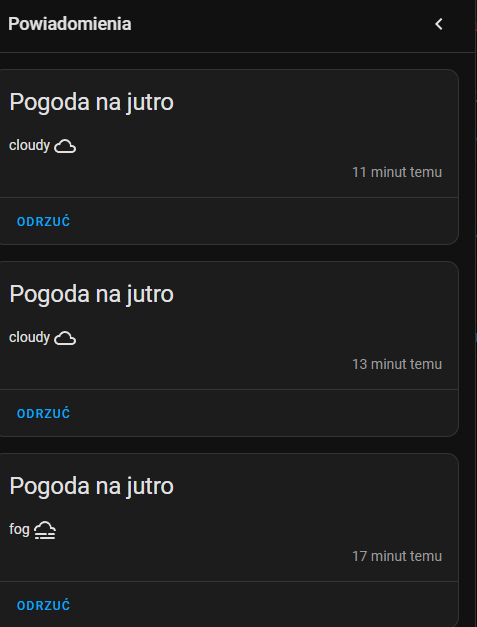
1 polubienie
Wyświetlane ikony mają być na floo planie jako własna pogoda.
type: custom:mushroom-chips-card
chips:
  - type: template
    content: >-
      {{ (strptime(states('sensor.date'), '%Y-%m-%d') +
      timedelta(days=1)).strftime('%A') }}
    icon: >-
      {% set condition = state_attr("weather.dom", "forecast")[0].condition %}
      {% if condition == 'clear-night' %}
        mdi:weather-night
      {% elif condition == 'cloudy' %}
        mdi:weather-cloudy
      {% elif condition == 'fog' %}
        mdi:weather-fog
      {% elif condition == 'hail' %}
        mdi:weather-hail
      {% elif condition == 'lightning' %}
        mdi:weather-lightning
      {% elif condition == 'lightning-rainy' %}
        mdi:weather-lightning-rainy
      {% elif condition == 'partlycloudy' %}
        mdi:weather-partly-cloudy
      {% elif condition == 'pouring' %}
        mdi:weather-pouring
      {% elif condition == 'rainy' %}
        mdi:weather-rainy
      {% elif condition == 'snowy' %}
        mdi:weather-snowy
      {% elif condition == 'snowy-rainy' %}
        mdi:weather-snowy-rainy
      {% elif condition == 'sunny' %}
        mdi:weather-sunny
      {% elif condition == 'windy' %}
        mdi:weather-windy
      {% elif condition == 'windy-variant' %}
        mdi:weather-windy-variant
      {% elif condition == 'exceptional' %}
        mdi:weather-hurricane
      {% endif %}
    icon_color: blue
    tap_action:
      action: none
    hold_action:
      action: none
    double_tap_action:
      action: none
    card_mod:
      style: |
        ha-card {
          margin-left: 8px;
        }

Fajne
teraz mam zrobione tak
  - conditions:
      - entity: weather.openweathermap
        state: clear-night
    elements:
      - image: local/img/anime/clear-night.svg
        style:
          pointer-events: none
          left: 13%
          top: 20%
          width: 20%
        type: image
    type: conditional
jak zmienić ten kod aby wyświetlało pogodę na jutro
Z tego kodu co pokazałleś nie da się uzystać pogody na jutro jedynie na “teraz”
type: picture-elements
image: /local/panele.jpg
elements:
  - type: image
    entity: weather.openweathermap
    show_state: false
    show_name: false
    state_image:
      clear-night: /local/weather/clear-night2.png
      cloudy: /local/weather/cloudy.gif
      exceptional: /local/weather/exceptional.png
      fog: /local/weather/fog3.gif
      hail: /local/weather/hail2.gif
      lightning: /local/weather/lightning3.gif
      lightning-rainy: /local/weather/lightning-rainy.jpeg
      partlycloudy: /local/weather/partly-cloudy.gif
      pouring: /local/weather/pouring.gif
      rainy: /local/weather/rainy.gif
      snowy: /local/weather/snowy.gif
      snowy-rainy: /local/weather/snowy-rainy.gif
      sunny: /local/weather/sunny.gif
      windy: /local/pweather/windy.gif
      windy-variant: /local/weather/windy.gif
    style:
      top: 50%
      left: 50%
      width: 20%
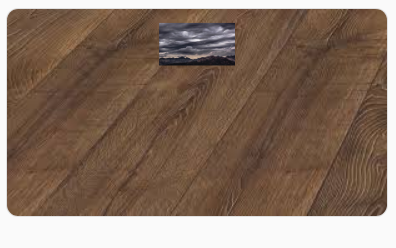
Na jutrzejszą pogodę musisz wykorzystać atrybut “forecast” (prognoza).
Wyżej masz kod który sprawdza atrybut encji i na jego podstawie zmienia dynamicznie ikonę.