ok niby działa teraz tylko zastanawiam się dlaczego ciągle mi się kręci kółeczko na środku

Z reguły jest to brak/zła encja w twoim kodzie. Udostępnij tu swój kod w formie *.txt
type: picture-elements
elements:
  - type: image
    action: none
    entity: sun.sun
    state_image:
      above_horizon: local/images/floorplan/74.png
      below_horizon: local/images/floorplan/no.png
    style:
      top: 100%
      height: 200%
      left: 50%
      width: 100%
  - type: image
    entity: switch.sonoff_100215243f
    name: niebieski
    style:
      top: 53%
      left: 50%
      width: 100%
      mix-blend-mode: lighten
    state_image:
      "on": local/imagefloorplan/nie.png
      "off": local/images/floorplan/no.png
  - type: image
    entity: switch.sonoff_1000b60086
    name: kib
    style:
      top: 50%
      left: 50%
      width: 100%
      mix-blend-mode: lighten
    state_image:
      "on": local/images/floorplan/kibel.png
      "off": local/images/floorplan/no.png
  - type: image
    entity: switch.sonoff_1000b70df2
    mane: mamy
    style:
      top: 53%
      left: 50%
      width: 100%
      mix-blend-mode: lighten
    state_image:
      "on": local/images/floorplan/m12a.png
  - type: state-icon
    size: 50%
    icon: mdi:lightbulb
    name: niebieski
    style:
      left: 29%
      top: 45%
    tap_action:
      action: toggle
    entity: switch.sonoff_100215243f
  - type: state-icon
    size: 50%
    icon: mdi:lightbulb
    name: kibel
    style:
      left: 27%
      top: 56%
    tap_action:
      action: toggle
    entity: switch.sonoff_1000b60086
  - type: state-icon
    size: 50%
    icon: mdi:ceiling-light
    name: mamy
    style:
      left: 35%
      top: 77%
    tap_action:
      action: toggle
    entity: switch.sonoff_1000b70df2
  - type: state-icon
    size: 50%
    icon: mdi:lightbulb
    name: Dzwi
    style:
      left: 50%
      top: 80%
    tap_action:
      action: toggle
    entity: binary_sensor.0x00124b00246c9565_contact
image: local/images/floorplan/no.png
a zmień na:
name: mamy
Lub bardziej czytelnie
name: Mamy
/
Wklej ten kod:
type: picture-elements
image: local/images/floorplan/no.png
elements:
  - type: image
    entity: sun.sun
    state_image:
      above_horizon: local/images/floorplan/74.png
      below_horizon: local/images/floorplan/no.png
    style:
      top: 100%
      left: 50%
      width: 100%
      height: 200%

  - type: image
    entity: switch.sonoff_100215243f
    name: niebieski
    state_image:
      "on": local/images/floorplan/nie.png
      "off": local/images/floorplan/no.png
    style:
      top: 53%
      left: 50%
      width: 100%
      mix-blend-mode: lighten

  - type: image
    entity: switch.sonoff_1000b60086
    name: kib
    state_image:
      "on": local/images/floorplan/kibel.png
      "off": local/images/floorplan/no.png
    style:
      top: 50%
      left: 50%
      width: 100%
      mix-blend-mode: lighten

  - type: image
    entity: switch.sonoff_1000b70df2
    name: mamy
    state_image:
      "on": local/images/floorplan/m12a.png
      "off": local/images/floorplan/no.png
    style:
      top: 53%
      left: 50%
      width: 100%
      mix-blend-mode: lighten

  - type: state-icon
    entity: switch.sonoff_100215243f
    icon: mdi:lightbulb
    name: niebieski
    tap_action:
      action: toggle
    style:
      top: 45%
      left: 29%
      width: 50%

  - type: state-icon
    entity: switch.sonoff_1000b60086
    icon: mdi:lightbulb
    name: kibel
    tap_action:
      action: toggle
    style:
      top: 56%
      left: 27%
      width: 50%

  - type: state-icon
    entity: switch.sonoff_1000b70df2
    icon: mdi:ceiling-light
    name: mamy
    tap_action:
      action: toggle
    style:
      top: 77%
      left: 35%
      width: 50%

  - type: state-icon
    entity: binary_sensor.0x00124b00246c9565_contact
    icon: mdi:door
    name: drzwi
    tap_action:
      action: toggle
    style:
      top: 80%
      left: 50%
      width: 50%
/
  - type: state-icon
    entity: binary_sensor.0x00124b00246c9565_contact
    icon: mdi:door
    name: drzwi
    tap_action:
      action: toggle
To jest sensor nie można go przełączyć toggle, proponuje zmienić na “pokaż więcej informacji” more-info
  - type: state-icon
    entity: binary_sensor.0x00124b00246c9565_contact
    icon: mdi:door
    name: drzwi
    tap_action:
action: more-infoDzięki za pomoc. Teraz nie ma kółeczka mam jeszcze dwa pytania do was, ale najpierw sam spróbuję problem rozwiązać. Okazało się że jednak nie jest ok gdyż w dzień wszystko jest ok to w nocy coś takiego mam
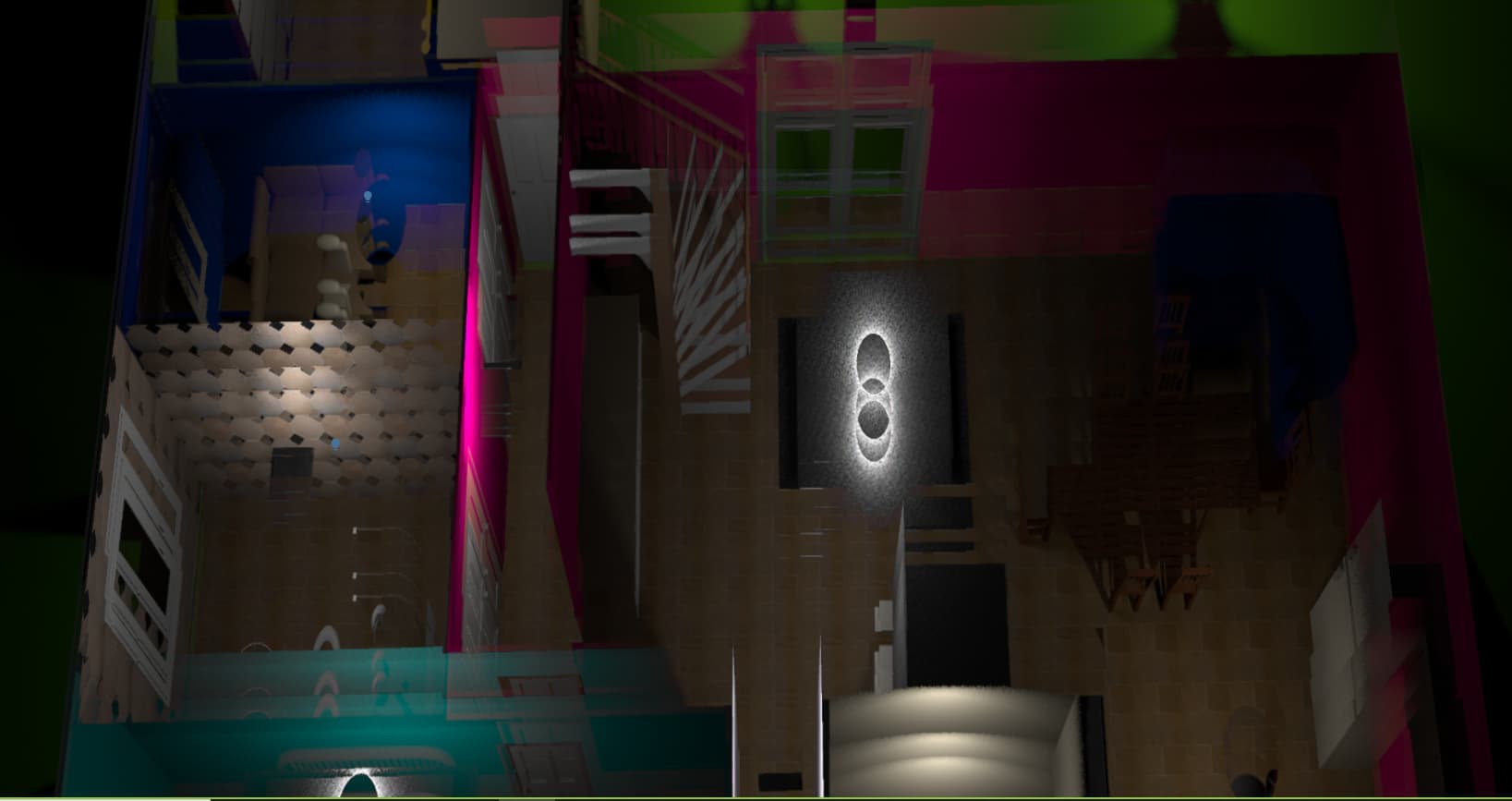
nakładająa mi się obrazy. Zauważyłem jak usunę parametr “mix-blend-mode” to obraz wraca na swoje miejsce, ale gdy klikę jakąś żarówkę to ona sie zapala i światło świeci w pokoju, ale już nie na planie .

Przesunięcie masz góra/dół, czyli któryś z top: do korekty
pozmieniałem i wszystko teraz jest ok dziękuję. Zastanawiam się nad jednym, czy można dodawać do tego planu np godzinę czy pogodę tak żeby wyświetlało to się w jednym kafelku gdyż podgląd mam zrobiony w układzie pojedynczy kafelek
Jeśli przykładowo stworzysz sobie encję czasu, to czemu nie?
chyba się nie rozumiemy wieczorem wyjaśnię o co mi dokładnie chodzi
Jeśli widok masz jako panel to jesteś ograniczony do tego co się da wyświetlić w danym typie karty (jak rozumiem masz tam jedną kartę picture-elements), więc jak chcesz wyświetlić “zegarek”, to musisz mieć encję czasu.
na obrazku karta picture-elements temperatura i wilgotność to prognoza pogody, a zegar to encja czasu
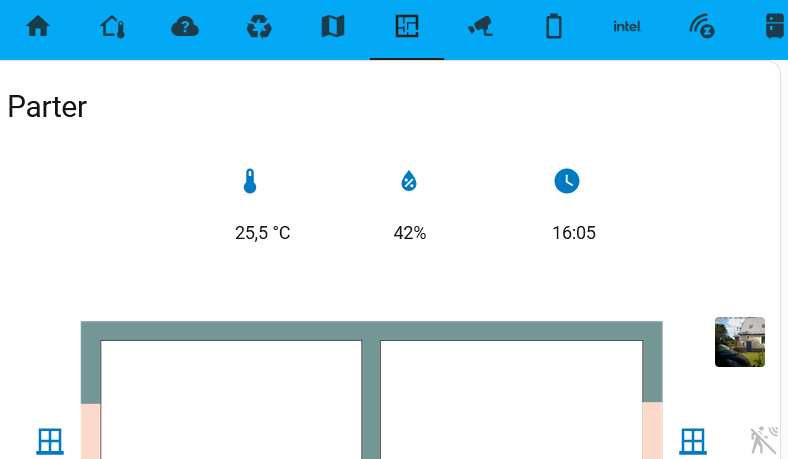
Jedna karta, a w niej mix (stary “szkic” stworzony do testu/zrozumienia picture-elements)
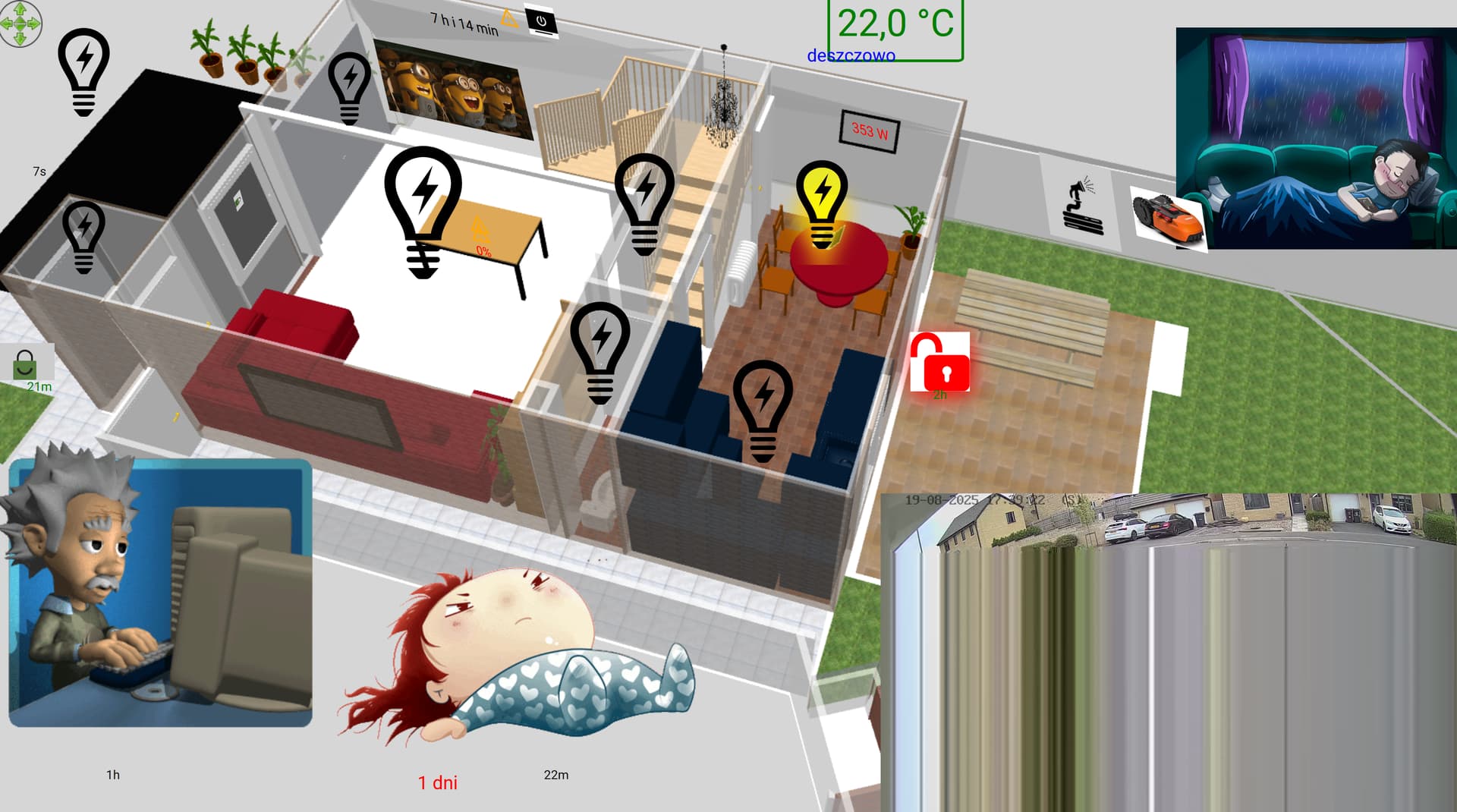
picture-elements
type: picture-elements
image: /local/parter.png
elements:
  - type: image
    entity: media_player.tv
    tap_action:
      action: toggle
    state_image:
      "on": /local/videogif2.gif
      "off": /local/tvstatic.gif
    style:
      top: 7%
      left: 26%
      width: 10%
      padding: 1px
      transform: rotate(12deg) rotateX(1deg) skewX(25deg)
  - type: state-label
    entity: sensor.tv_czas_pracy
    style:
      top: 1%
      left: 29%
      text-align: center
      font-size: 15px
      color: black
      transform: rotate(12deg) rotateX(1deg) skewX(25deg)
      text_template: bndbnj
  - type: state-label
    entity: sensor.tv_volume
    style:
      top: 1%
      left: 34%
      font-size: 14px
      color: green
      transform: rotate(12deg) rotateX(1deg) skewX(25deg)
  - type: image
    entity: switch.tv
    tap_action:
      action: toggle
    state_image:
      "on": /local/tv-onoff.jpg
      "off": /local/tv-onoff.jpg
    style:
      top: 1%
      left: 36%
      width: 2%
      transform: rotate(11deg) rotateX( 2deg) skewX(23deg)
  - type: custom:last-changed-element
    entity: switch.tv
    style:
      left: 3%
      top: 21%
  - type: image
    entity: switch.kitchen_light_l2
    tap_action:
      action: toggle
    image: /local/lightbulb_off.svg
    state_image:
      "on": /local/lightbulb_on.svg
    state_filter:
      "on": brightness(130%) saturate(3.5) drop-shadow(0px 32px 10px gold)
      "off": brightness(80%) saturate(1.8)
    style:
      top: 25%
      left: 56%
      width: 6%
      padding: 18px
  - type: image
    entity: light.tuya_zyrandol
    tap_action:
      action: toggle
    hold_action:
      action: more-info
    image: /local/lightbulb_off.svg
    state_image:
      "on": /local/lightbulb_on.svg
    state_filter:
      "on": brightness(130%) saturate(1.5) drop-shadow(0px 0px 10px gold)
      "off": brightness(80%) saturate(0.8)
    style:
      top: 26%
      left: 29%
      width: 9%
      padding: 1px
  - type: image
    entity: light.lampa_zewnetrzna
    tap_action:
      action: toggle
    hold_action:
      action: more-info
    image: /local/lightbulb_off.svg
    state_image:
      "on": /local/lightbulb_on.svg
    state_filter:
      "on": brightness(130%) saturate(1.5) drop-shadow(0px 0px 10px gold)
      "off": brightness(80%) saturate(0.8)
    style:
      top: 9%
      left: 6%
      width: 6%
  - type: image
    entity: light.tuya_zl
    tap_action:
      action: toggle
    hold_action:
      action: more-info
    image: /local/lightbulb_off.svg
    state_image:
      "on": /local/lightbulb_on.svg
    state_filter:
      "on": brightness(130%) saturate(1.5) drop-shadow(0px 0px 10px gold)
      "off": brightness(80%) saturate(0.8)
    style:
      top: 11%
      left: 24%
      width: 5%
      padding: 90px
  - type: state-label
    entity: sensor.living_room_temperature
    style:
      top: 25.5%
      left: 32%
      font-size: 20px
      text-align: center
      transform: rotate(11deg) rotateX(2deg) skewX(23deg)
      color: black
  - type: state-label
    entity: sensor.living_room_humidity
    style:
      "--ha-label-badge-font-size": 1em
      top: 27%
      left: 32%
      font-size: 13px
      text-align: center
      padding: 2px
      transform: rotate(11deg) rotateX(2deg) skewX(23deg)
      color: red
  - type: state-label
    entity: sensor.living_room_heating
    style:
      "--ha-label-badge-font-size": 1em
      top: 28.5%
      left: 32%
      font-size: 13px
      padding: 2px
      transform: rotate(11deg) rotateX(2deg) skewX(23deg)
      color: red
  - type: image
    entity: sensor.radek_status
    show_state: false
    show_name: false
    state_image:
      W domu: /local/rdk.gif
      W samochodzie: /local/auto-e-samochod-ruchomy-obrazek-0290.gif
      W pracy: /local/cc.gif
      xxna: /local/gl.gif
      xxona: /local/gl.gif
      W xxxxlade: /local/gl.gif
      failed: /local/nie ma.gif
    style:
      top: 70%
      left: 12%
      width: 25%
  - type: custom:last-changed-element
    entity: person.zzz
    style:
      left: 8%
      top: 94%
  - type: image
    entity: sensor.xxx_status
    show_state: false
    show_name: false
    state_image:
      W domu: /local/xxx spi.gif
      W samochodzie: /local/ddd.gif
      grzegorz: /local/gr.gif
      W pracy: /local/xxx praca.gif
      lidl: /local/lidl.gif
      failed: /local/nie ma.gif
      marek: /local/marek.gif
      ss: /local/ss.gif
    style:
      top: 77%
      left: 36%
      width: 29%
  - type: custom:last-changed-element
    entity: person.xxx
    style:
      left: 38%
      top: 94%
  - type: image
    entity: light.lifx_mini_w_30b
    tap_action:
      action: toggle
    image: /local/lightbulb_off.svg
    state_image:
      "on": /local/lightbulb_on.svg
    state_filter:
      "on": brightness(130%) saturate(1.5) drop-shadow(0px 0px 10px gold)
      "off": brightness(80%) saturate(0.8)
    style:
      top: 43%
      left: 41%
      width: 7%
      padding: 7px
  - type: image
    entity: switch.kitchen_light_l1
    tap_action:
      action: toggle
    image: /local/lightbulb_off.svg
    state_image:
      "on": /local/lightbulb_on.svg
    state_filter:
      "on": drop-shadow(-1px -5px 9px gold)
      "off": brightness(80%) saturate(0.8)
    style:
      top: 50%
      left: 52%
      width: 7%
      padding: 55px
  - type: image
    entity: light.ganek_light
    tap_action:
      action: toggle
    image: /local/lightbulb_off.svg
    state_image:
      "on": /local/lightbulb_on.svg
    state_filter:
      "on": brightness(130%) saturate(3.5) drop-shadow(0px 22px 9px gold)
      "off": brightness(80%) saturate(1.8)
    style:
      top: 29%
      left: 6%
      width: 5%
      padding: 180px
  - type: state-label
    entity: sensor.licznik_1_power
    style:
      top: 14%
      left: 57.5%
      background: center
      text-align: center
      font-size: 15px
      color: red
      transform: rotate(14deg) rotateX(2deg) skewX(22deg)
  - type: image
    entity: light.parter
    tap_action:
      action: toggle
    image: /local/lightbulb_off.svg
    state_image:
      "on": /local/lightbulb_on.svg
    state_filter:
      "on": brightness(130%) saturate(1.5) drop-shadow(0px 0px 10px gold)
      "off": brightness(80%) saturate(0.8)
    style:
      top: 25%
      left: 44%
      width: 7%
      padding: 7px
  - type: image
    entity: binary_sensor.on_off_ogrodowe_contact
    image: /local/zielony-pukt.png
    state_image:
      "on": /local/kłudka-otwarta.png
      "off": /local/zielona-kłudka.gif
    state_filter:
      "on": brightness(130%) saturate(1.5) drop-shadow(2px 6px 12px red)
      "off": brightness(90%) saturate(0.8)
    style:
      top: 44%
      left: 64%
      width: 4%
      padding: 122px
  - type: custom:last-changed-element
    entity: binary_sensor.on_off_ogrodowe_contact
    style:
      left: 64%
      top: 48%
      color: green
  - type: image
    entity: binary_sensor.on_off_okno_salon_contact
    image: /local/zielony-pukt.png
    state_image:
      "on": /local/kłudka-otwarta.png
      "off": /local/zielona-kłudka.gif
    state_filter:
      "on": brightness(130%) saturate(1.5) drop-shadow(0px 0px 10px gold)
      "off": brightness(80%) saturate(0.8)
    style:
      top: 24%
      left: 16%
      width: 1%
      transform: rotate(74deg) rotateX(23deg) skewX(34deg)
  - type: image
    entity: binary_sensor.on_off_frontowe_contact
    image: /local/zielony-pukt.png
    state_image:
      "on": /local/kłudka-otwarta.png
      "off": /local/zielona-kłudka.gif
    state_filter:
      "on": brightness(130%) saturate(1.5) drop-shadow(0px 0px 10px gold)
      "off": brightness(80%) saturate(0.8)
    style:
      top: 44%
      left: 2%
      width: 4%
      padding: 110px
  - type: custom:last-changed-element
    entity: binary_sensor.on_off_frontowe_contact
    style:
      left: 3%
      top: 47%
      color: green
  - type: state-label
    entity: sensor.temp_srednia
    style:
      top: 3%
      left: 61%
      font-size: 42px
      color: green
      border: solid green
      border-radius: 5%
  - type: state-label
    entity: weather.openweathermap
    style:
      top: 7%
      left: 58%
      font-size: 20px
      color: blue
  - type: image
    entity: switch.zraszacze
    image: /local/zielony-pukt.png
    state_image:
      "on": /local/zraszacz.gif
      "off": /local/zraszaczoff.png
    state_filter:
      "on": brightness(130%) saturate(1.5) drop-shadow(0px 0px 10px gold)
      "off": brightness(80%) saturate(0.8)
    style:
      top: 20%
      left: 71%
      width: 5%
      transform: rotate(14deg) rotateX(2deg) skewX(22deg)
  - type: image
    entity: camera.parking
    camera_image: camera.parking
    style:
      top: 80%
      left: 80%
      width: 40%
  - type: conditional
    conditions:
      - entity: binary_sensor.pir_zewnetrzny_occupancy
        state: "on"
    elements:
      - type: image
        entity: camera.parking
        camera_view: live
        camera_image: camera.parking
        card_mod:
          style: |
            ha-card {
              color: red;
              outline: {% if is_state('binary_sensor.pir_zewnetrzny_occupancy', 'on') %} solid {% else %} none {% endif %};
            }
        tap_action:
          action: more_info
        style:
          top: 47%
          left: 33%
          width: 90%
  - type: conditional
    conditions:
      - entity: sensor.salon_grzejnik_on
        state: "on"
    elements:
      - type: image
        entity: sensor.salon_grzejnik_on
        image: /local/radiator.gif
        style:
          left: 24%
          top: 15%
          width: 3%
          transform: rotate(0deg) rotateX(6deg) skewX(22deg)
        image_state:
          "on": /local/radiator.gif
  - type: image
    entity: weather.openweathermap
    show_state: false
    show_name: false
    state_image:
      clear-night: /local/weather/clear-night2.png
      cloudy: /local/weather/cloudy.gif
      exceptional: /local/weather/exceptional.png
      fog: /local/weather/fog3.gif
      hail: /local/weather/hail2.gif
      lightning: /local/weather/lightning3.gif
      lightning-rainy: /local/weather/lightning-rainy.jpeg
      partlycloudy: /local/weather/partly-cloudy.gif
      pouring: /local/weather/pouring.gif
      rainy: /local/weather/rainy.gif
      snowy: /local/weather/snowy.gif
      snowy-rainy: /local/weather/snowy-rainy.gif
      sunny: /local/weather/sunny.gif
      windy: /local/pweather/windy.gif
      windy-variant: /local/weather/windy.gif
    style:
      top: 17%
      left: 90%
      width: 20%
  - type: conditional
    conditions:
      - entity: binary_sensor.deszcz_water_leak
        state: "on"
    elements:
      - type: image
        image: /local/deszcz2.gif
        tap_action:
          action: more-info
        style:
          left: 90%
          top: 5%
          width: 11%
  - type: conditional
    conditions:
      - entity: binary_sensor.deszcz_water_leak
        state: "on"
    elements:
      - type: custom:last-changed-element
        entity: binary_sensor.deszcz_water_leak
        style:
          left: 92%
          top: 30%
          color: red
          font-size: 25px
  - type: conditional
    conditions:
      - entity: lawn_mower.azor
        state: mowing
    elements:
      - type: image
        image: /local/kosiarka.jpg
        style:
          top: 24%
          left: 77%
          width: 10%
          border-radius: 2%
          transform: rotate(14deg) rotateX(2deg) skewX(22deg)
  - type: conditional
    conditions:
      - entity: lawn_mower.azor
        state: mowing
    elements:
      - type: custom:last-changed-element
        entity: lawn_mower.azor
        style:
          left: 82%
          top: 21%
          color: blue
  - type: image
    entity: lawn_mower.azor
    image: /local/kosiarka.jpg
    state_image:
      mowing: /local/worx on.gif
      home: /local/kosiarka.jpg
      edgecut: /local/cutting edge.gif
      returning: /local/cutting edge.gif
    style:
      top: 24%
      left: 77%
      width: 5%
      border-radius: 2%
      transform: rotate(14deg) rotateX(2deg) skewX(22deg)
  - type: state-label
    entity: sensor.kalendarz_template_dni
    style:
      top: 95%
      left: 30%
      font-size: 21px
      color: red
Pamientaj, że elementy są nakładane warstwowo (ostani elemen w kodzie będzie wyświetlany nad innymi elementami)
ok działa, ale chciałbym sobie na tej karcie zamieścić pogodę i jest błędna konfiguracja jaki typ użyć do pogody
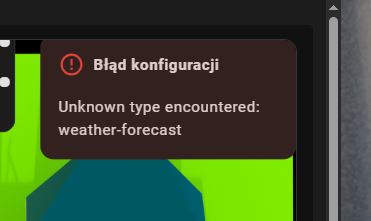
- type: weather-forecast
    name: Su
    entity: weather.forecast_dom
    forecast_type: daily
    show_current: true
    show_forecast: true
    style:
      top: 8%
      left: 75%
      width: 50%
Sam sobie wymyślasz typy elementów? Zajrzyj do dokumentacji co można użyć…
jak bym wiedział jaki typ użyć to by się nie pytał
To czemu nie czytasz dokumentacji?
Użyj nie encji prognozy, a np. encji temperatury z tej samej integracji co prognoza (albo użyj atrybutu z prognozy - jak stryjenka woli) ten kawałek kodu jest z karty którą widać na obrazku w jakimś moim poście wyżej
      - entity: sensor.owm_temperature
        style:
          "--ha-label-badge-font-size": 1em
          left: 30%
          top: 0%
          transform: none
        type: state-icon
      - entity: sensor.owm_temperature
        style:
          "--ha-label-badge-font-size": 1em
          left: 30%
          top: 5%
          transform: none
        type: state-label